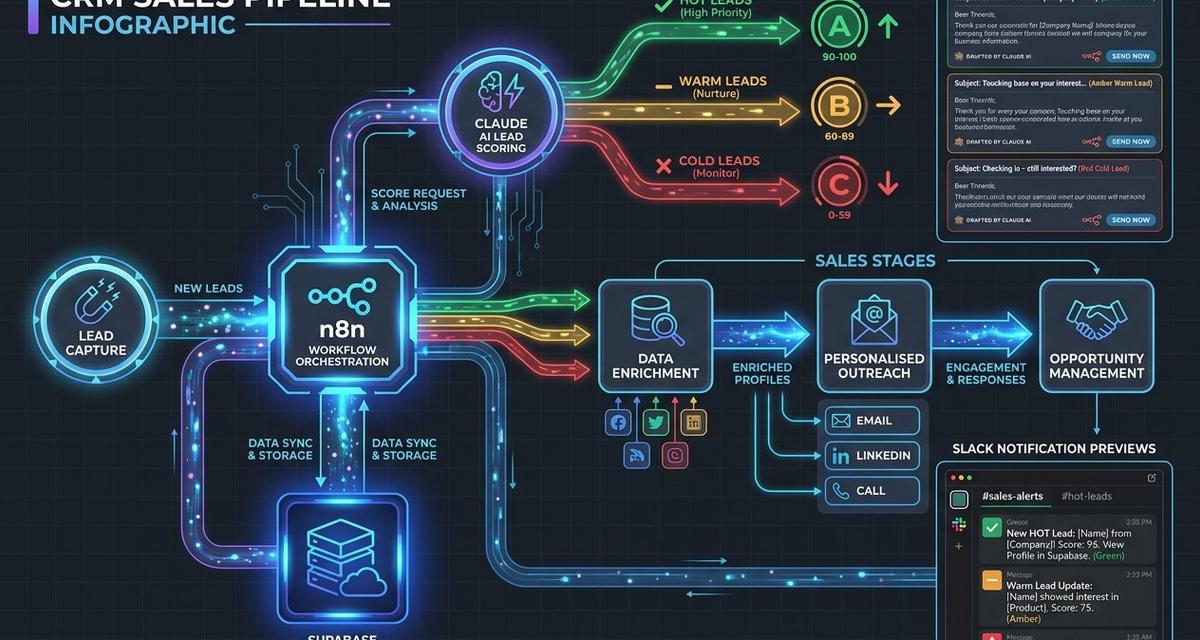
The UK CRM market is worth a staggering £2.9 billion in 2026, yet many small and medium businesses still rely on spreadsheets, disconnected inboxes, and manual data entry to manage their sales pipelines. The good news? You no longer need an enterprise budget to build a powerful, AI-driven CRM. By combining n8n for workflow automation, Supabase as your database backbone, and Claude AI for intelligent lead processing, you can create a sales automation workflow that rivals platforms costing thousands per month.
In this guide, we walk you through exactly how to build an AI CRM pipeline from scratch, one that captures leads, enriches them with AI, scores their buying intent, and even drafts personalised outreach emails, all without writing a single line of front-end code.
Why Build a Custom AI CRM Pipeline?
Off-the-shelf CRM platforms like Salesforce and HubSpot are powerful, but they come with hefty subscription fees, rigid structures, and feature bloat that many UK SMEs simply do not need. A custom-built pipeline using open-source and flexible tools offers several compelling advantages:
- Cost efficiency: n8n’s self-hosted Community Edition is free, and Supabase’s generous free tier supports up to 50,000 monthly active users and 500 MB of database storage.
- Full data ownership: With Supabase running on PostgreSQL, your customer data stays under your control, a critical consideration for UK GDPR compliance.
- AI-native intelligence: Claude’s API enables lead enrichment, sentiment analysis, and personalised email drafting that traditional CRMs simply cannot match out of the box.
- Infinite flexibility: Unlike locked-down SaaS platforms, every component can be tailored to your exact sales process.
According to SellersCommerce, businesses earn an average of $8.71 ROI for every $1 spent on CRM. With a custom AI CRM pipeline, you can achieve even greater returns by eliminating unnecessary licensing costs while adding intelligent automation that generic platforms lack.
The Technology Stack Explained
n8n: Your Workflow Automation Engine
n8n is an open-source, source-available workflow automation platform with over 400 pre-built integrations. Unlike Zapier or Make, n8n allows you to self-host for free, write custom JavaScript or Python within workflows, and build complex branching logic visually. Its native AI Agent node, introduced with n8n 2.0, makes it particularly well-suited for n8n CRM automation scenarios where you need intelligent decision-making within your pipelines.
Supabase: Your Open-Source Database
Supabase is an open-source Firebase alternative built on PostgreSQL. For a Supabase CRM application, it provides relational data modelling, Row Level Security for access control, real-time subscriptions for live dashboard updates, and built-in authentication. Following its $500 million Series F raise in June 2026, Supabase has also added pgvector support for AI-powered semantic search, making it ideal for storing and querying lead embeddings.
Claude AI: Your Intelligent Processing Layer
Anthropic’s Claude has evolved from a chatbot into an autonomous execution platform. With approximately 245 million monthly active users and 77% of enterprise API interactions running in automation mode, Claude is purpose-built for the kind of lead management AI tasks that power modern CRM pipelines. Its ability to parse unstructured data, assess buying intent, and generate natural language makes it the perfect AI layer for your sales process.
Step-by-Step: Building Your AI CRM Pipeline
Step 1: Design Your Supabase Database Schema
A well-structured database is the foundation of any effective CRM. In Supabase’s SQL Editor, create four core tables:
Leads table: Stores core contact information including email, name, company, lead source, status, and timestamps. Use a UUID primary key with auto-generation for scalability.
Lead enrichment table: Stores AI-generated data such as inferred job title, industry classification, estimated company size, and identified pain points. This table references the leads table via a foreign key.
Lead scores table: Captures the AI-calculated score (0 to 100), the reasoning behind the score, and a priority flag for hot leads. This enables your sales team to focus on the highest-value opportunities first.
Outbound emails table: Stores Claude-generated email drafts with subject lines, body content, and a status field (draft, reviewed, sent) for human-in-the-loop approval.
Enable Row Level Security on all tables to ensure that only authenticated users can access lead data. This is especially important for UK businesses handling personal data under GDPR regulations.
Step 2: Connect n8n to Supabase
The n8n and Supabase integration is straightforward. Navigate to your Supabase project settings, find your API section, and copy both the project URL and the Service Role Key. In n8n, create a new Supabase credential using these values. You can then add Supabase nodes throughout your workflow to insert, read, update, and delete rows as needed.
Step 3: Create Your Lead Capture Webhook
Start your n8n workflow with a Webhook node set to accept POST requests. This webhook URL becomes the endpoint for your website contact forms, landing pages, or third-party lead generation tools. When a new lead submits their details, the webhook triggers the entire sales automation workflow automatically.
Connect the Webhook node to a Supabase Insert node that writes the incoming lead data to your leads table. Add a Set node between them to validate and sanitise the incoming data, ensuring only clean records enter your CRM.
Step 4: Enrich Leads with Claude AI
This is where your AI CRM pipeline truly comes alive. After inserting a new lead, add an HTTP Request node configured to call the Anthropic Messages API. Craft a structured prompt that sends the lead’s company name, email domain, and source channel to Claude, asking it to return a JSON object containing the inferred job title, industry, company size estimate, and three potential pain points relevant to UK businesses.
Claude’s response transforms sparse form submissions into rich lead profiles. A lead that submitted only their name and email now has an inferred role, industry context, and specific challenges your sales team can address in their outreach.
Use a Function node to parse Claude’s JSON response, then route the enrichment data to a Supabase Insert node targeting your lead_enrichment table.
Step 5: Score and Prioritise Leads
In the same Claude API call, or in a separate processing step, ask Claude to assign a lead score from 0 to 100 based on factors like company size, industry fit, and inferred buying urgency. According to Capsule CRM research, UK SMEs adopting AI-powered CRM features are growing at 16.2% annually, and intelligent lead scoring is a primary driver of that growth.
Store the score and reasoning in your lead_scores table. Add an If node in n8n to branch the workflow: leads scoring above 70 proceed to automated email drafting, while lower-scoring leads enter a nurture sequence.
Step 6: Draft Personalised Outreach Emails
For high-priority leads, add a second Claude API call that generates a personalised cold outreach email. Feed it the enrichment data and pain points from the previous step, and instruct it to write in a professional, concise UK business tone. Store the generated subject line and email body in your outbound_emails table with a status of draft.
This human-in-the-loop approach means your sales team reviews and approves each email before sending, maintaining authenticity while saving hours of manual copywriting. Research from SuperOffice shows that CRM automation saves employees 5 to 10 hours per week, and AI-drafted emails are a significant contributor to those time savings.
Advanced Enhancements
Real-Time Notifications
Add Slack or Microsoft Teams nodes to your n8n workflow to instantly notify your sales team when a high-priority lead enters the pipeline. Include the lead score, company name, and top pain point in the notification so reps can act immediately.
Automated Follow-Up Sequences
Use n8n’s Schedule Trigger node to create timed follow-up workflows. If a lead has not responded within three days, automatically generate a follow-up email variation using Claude and update the outbound_emails table accordingly.
Pipeline Analytics with Supabase Views
Create PostgreSQL views in Supabase to aggregate pipeline metrics such as conversion rates by source, average lead scores by industry, and response rates by email template. These views can power a simple dashboard using Supabase’s real-time subscriptions.
Why Professional Guidance Makes a Difference
While the tools described above are accessible to technically minded business owners, designing an effective lead management AI system requires more than just connecting nodes. The difference between a pipeline that generates revenue and one that gathers dust often comes down to strategic configuration: choosing the right scoring criteria, crafting prompts that produce genuinely useful enrichment data, and building error handling that prevents data loss.
At Kaizen AI Consulting, we specialise in helping UK businesses design and implement exactly these kinds of AI-powered automation systems. From initial architecture planning through to deployment and optimisation, our team ensures your n8n CRM automation delivers measurable results from day one. Whether you need a complete custom build or expert guidance to refine an existing setup, we bring hands-on experience with n8n, Supabase, and Claude to every engagement.
Getting Started: Your Implementation Checklist
- Sign up for a free Supabase project and create your database schema
- Deploy n8n (self-hosted via Docker or on n8n Cloud from $20 per month)
- Obtain your Anthropic API key for Claude access
- Build your lead capture webhook and test with sample data
- Configure Claude prompts for enrichment, scoring, and email drafting
- Set up notification channels for your sales team
- Implement Row Level Security and GDPR-compliant data handling
- Test the complete pipeline end to end before going live
The Bottom Line
Building an AI CRM pipeline with n8n, Supabase, and Claude is no longer a futuristic ambition; it is a practical, affordable project that UK businesses of any size can undertake today. With CRM adoption boosting lead conversions by up to 300% and AI-powered systems delivering 40% better sales forecast accuracy, the question is not whether to automate your sales pipeline, but how quickly you can get started.
If you would like expert support building your own AI-powered CRM pipeline, get in touch with Kaizen AI Consulting today. We help UK businesses turn ambitious automation ideas into production-ready systems that drive real revenue growth. You can also explore our insights on scaling businesses with expert guidance for more strategies to accelerate your growth.


