How to Automate Client Onboarding with Supabase and N8N
First impressions matter enormously in business. Yet for many UK agencies, consultancies, and SaaS companies, the client onboarding process remains a tangle of manual emails, spreadsheet tracking, and copy-paste data entry. The good news? A powerful combination of Supabase and N8N can transform your client onboarding workflow into a seamless, automated system that impresses new clients from the very first interaction.
According to a 2026 Swiftcase report on UK workflow automation statistics, 59% of UK businesses have adopted or are piloting AI-augmented workflows, and 31% have fully automated at least one core business function. Yet despite rising adoption, many businesses are still manually managing onboarding sequences that could easily be delegated to smart, event-driven automation. The result is wasted time, inconsistent client experiences, and slower growth.
This guide walks you through exactly how to build a robust, scalable client onboarding workflow using Supabase as your business backend and N8N as your automation engine.
Why Supabase and N8N Are the Perfect Pairing for Business Backend Automation
Before diving into the build, it helps to understand why this particular tech stack has become a go-to choice for modern UK businesses and digital agencies.
Supabase is an open-source Postgres development platform that provides a fully managed relational database, built-in authentication, real-time subscriptions, Edge Functions, and auto-generated REST and GraphQL APIs. Unlike traditional databases that require significant DevOps overhead, Supabase lets you spin up a production-ready database automation backend in minutes. According to Digital Applied’s 2026 backend comparison guide, Supabase Edge Functions offer cold start times that are up to 10 times faster than Firebase Cloud Functions, making them ideal for high-volume, event-driven automations.
N8N is a self-hostable, open-source workflow automation tool that connects over 400 apps and services. Its native Supabase node supports full CRUD operations, meaning you can create, read, update, and delete database records directly from your automation workflows. The Hackceleration Supabase N8N integration guide confirms that the five core actions available (Create, Get, Get Many, Update, and Delete) cover virtually every use case for a client onboarding system.
Together, these tools form a highly capable, cost-effective business backend that scales from a two-person consultancy to a multi-client agency operation.
What Does an Automated Client Onboarding Workflow Look Like?
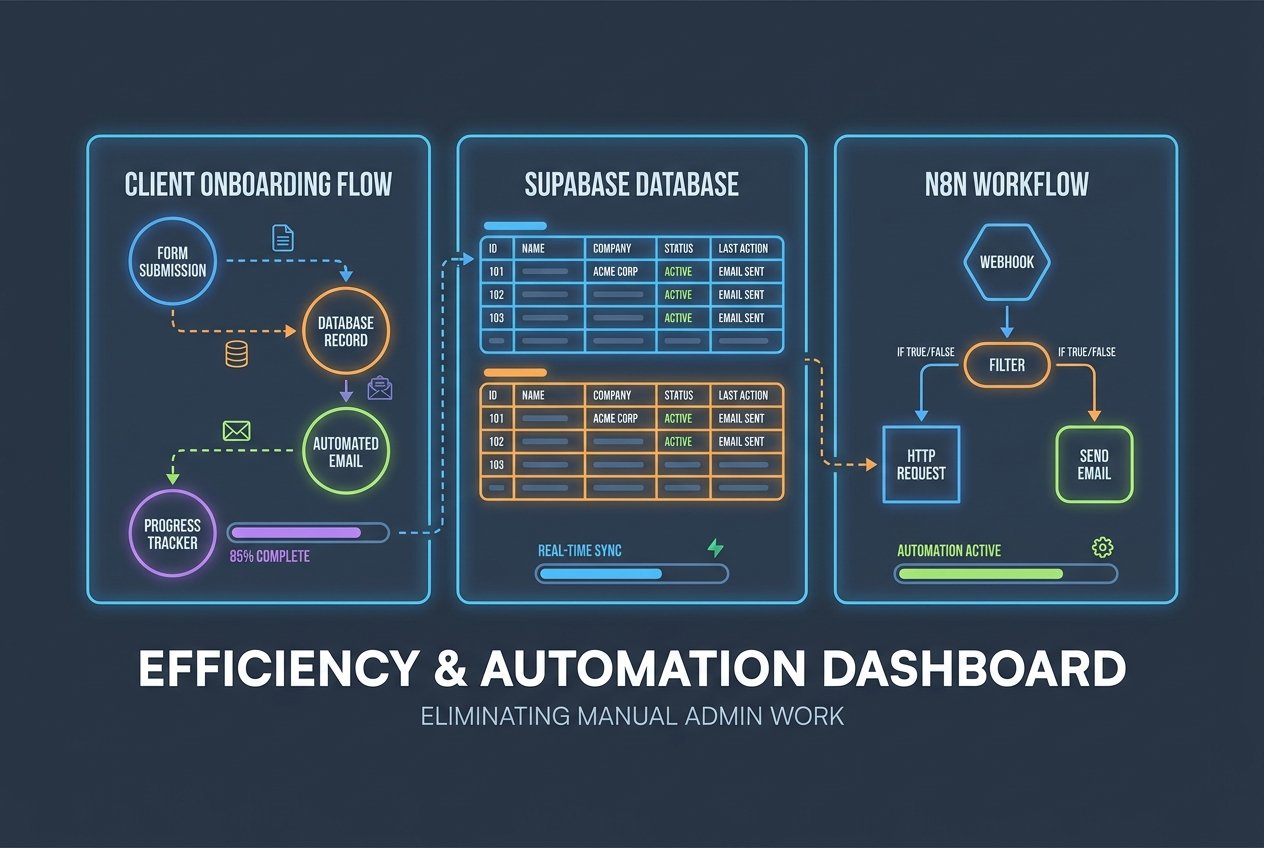
A well-designed N8N Supabase onboarding flow typically covers five stages:
Stage 1: Client Intake via Form Submission
The process begins when a new client completes an intake form, whether that is a Typeform, a Webflow form, or a custom HTML form. N8N listens for this submission via a Webhook trigger node. The incoming data (client name, email address, company, service tier, and any custom fields) is immediately parsed and passed to the next stage.
Stage 2: Database Record Creation in Supabase
The parsed form data is passed to N8N’s Supabase node, which uses the Create operation to insert a new row into your client_onboarding table. A well-structured table might include fields such as client name, email, company, onboarding status (set to pending by default), assigned account manager, and a timestamp. This single step replaces hours of manual data entry and ensures every client is captured accurately in your central database automation system.
Stage 3: Automated Welcome Communications
Once the record is created, N8N immediately fires a personalised welcome email using an email node (such as Gmail, Outlook, or Resend). The email can pull the client’s name, company, and any bespoke information directly from the Supabase record. Simultaneously, a Slack notification can alert the relevant account manager, and a task can be automatically created in your project management tool of choice, whether that is ClickUp, Notion, or Asana.
Agencies implementing this kind of N8N Supabase workflow have reported reducing manual onboarding time from two hours per client to under ten minutes, according to a case study published by N8N.expert.
Stage 4: Using Supabase Database Triggers to Drive Real-Time Automation
One of the most powerful aspects of Supabase automation is the ability to use Postgres database triggers and Edge Functions to fire events in real time. Here is how to set this up:
- In your Supabase SQL Editor, create a Postgres trigger function that calls a Supabase Edge Function whenever a new row is inserted into your
client_onboardingtable. - The Edge Function (written in TypeScript/Deno) sends an HTTP POST request to your N8N Webhook URL, passing the new record as the payload.
- N8N receives the payload and executes the next stage of your workflow, such as sending a document signing request, scheduling a kickoff call via Cal.com, or updating a CRM record in HubSpot or Pipedrive.
This database-trigger approach means your workflows respond in real time rather than relying on scheduled polling, delivering a far smoother experience for your new clients.
Stage 5: Status Updates and Progress Tracking
As the client progresses through onboarding, N8N updates the status field in Supabase from pending to in progress to complete. These status changes can themselves trigger further automations: sending a satisfaction survey upon completion, creating an invoice in Xero or QuickBooks, or moving the client into your retention email sequence. The entire journey is tracked in a single Supabase table, giving your team full visibility at a glance.
The Business Case for Automating Client Onboarding in the UK
The productivity argument for client onboarding workflow automation is compelling. The UK currently lags the G7 average by approximately 16% on productivity, according to Swiftcase’s 2026 UK automation benchmarks. Closing this gap through intelligent automation is not just a competitive advantage, it is a strategic necessity.
Key statistics that make the case:
- Automated onboarding sequences save 80 to 90% of manual processing time per client, according to Hackceleration’s Supabase N8N integration review.
- 67% of SaaS churn occurs within the first 90 days, and the majority of this is linked to a poor or delayed onboarding experience, as highlighted in the Equanax N8N SaaS onboarding guide.
- AI-enhanced workflows produce 34% faster decision-making across business operations (Deloitte, 2025, via Swiftcase).
- 45% of UK SMEs using automation tools report faster execution of routine processes, whilst 39% report a reduced staff workload, according to the UK SME AI Adoption Report 2026.
The UK AI in workforce automation market is valued at USD 4.4 billion in 2026 and is projected to reach USD 9.3 billion by 2031, growing at a 16.1% CAGR according to Knowledge Sourcing Intelligence. Businesses that build automated systems now will be significantly ahead of competitors still relying on manual processes.
Practical Tips for Building Your N8N Supabase Onboarding System
Whether you are setting this up for the first time or refining an existing workflow, the following best practices will help you build a reliable, professional system:
Start with a Single Trigger Workflow
Resist the temptation to automate everything at once. Begin with the most impactful step: form submission to Supabase record creation to welcome email. Once that is stable and tested, layer in additional nodes for Slack alerts, CRM syncing, and scheduling.
Use Row Level Security in Supabase
For any workflow that touches client data, enable Supabase’s Row Level Security (RLS) policies to ensure that only authorised services and users can access specific records. Use your service role key exclusively within N8N credentials and never expose it client-side.
Build in Error Handling
N8N’s IF and Switch nodes allow you to validate incoming data before it reaches Supabase. For example, check whether an email address already exists in your database before attempting an insert, and route duplicates to an update workflow instead. This prevents messy data and failed executions.
Implement Human-in-the-Loop Steps for High-Value Clients
Automation does not mean removing the human touch entirely. For high-value accounts, insert a Slack approval step that notifies a senior account manager before the automated welcome sequence fires. This hybrid approach delivers the speed of automation with the personalisation that premium clients expect.
Monitor and Iterate
Use N8N’s built-in execution logs alongside Supabase’s database analytics to monitor workflow performance. Track metrics such as time from form submission to welcome email delivery, onboarding completion rates, and any error frequency. Use these insights to continuously refine your workflow.
Where Kaizen AI Consulting Can Help
Building a Supabase automation and N8N client onboarding system from scratch requires a solid understanding of database design, webhook architecture, and workflow logic. For many UK businesses, the challenge is not knowing what to build but having the time and technical expertise to build it well.
At Kaizen AI Consulting, we specialise in designing and implementing custom AI-powered automation systems for UK businesses. From scoping your onboarding requirements and architecting your Supabase database schema, to configuring every N8N node and integrating with your existing CRM, email platform, and project management tools, we handle the full build so your team can focus on delivering excellent client work. You can explore our full range of AI automation services here.
Whether you are a digital agency tired of manual onboarding, a SaaS business looking to reduce early churn, or a consultancy wanting to professionalise its client experience, our team can design a bespoke workflow that fits your exact processes and scales with your growth.
Getting Started: Your Next Steps
Automating your client onboarding workflow with Supabase and N8N is one of the highest-return investments you can make in your business operations. The tools are powerful, the learning curve is manageable, and the impact on client experience and team efficiency is immediate.
Here is a simple action plan to get started this week:
- Audit your current onboarding process and identify every manual step.
- Set up a free Supabase project and create your
client_onboardingtable. - Install N8N (cloud or self-hosted) and connect it to your Supabase project using your API credentials.
- Build your first webhook-to-database workflow and test it end-to-end.
- Gradually add communication, notification, and status-update nodes to complete the automation chain.
If you would rather have experts build this for you, or if you want to ensure your system is architected correctly from day one, get in touch with the team at Kaizen AI Consulting for a free discovery call. We will assess your current processes, recommend the right automation architecture, and build a solution that saves your team hours every single week.
The future of client onboarding is automated, personalised, and powered by a smart business backend. With Supabase and N8N, that future is well within reach.