
An earlier version of this tool, built for one of our clients, generated £7m worth of leads in 11 months. Worktop Compare is the rebuild, and this time we went after two things: a better lead for the supplier, and an experience for the homeowner that, until recently, only a big budget could buy. A live 3D preview of their own worktop layout, inside a six-step price calculator, built by us with Claude and a handful of AI tools in one month.
This is the fourth in our Friday series of real Kaizen builds. Here is what we built, why the leads it produces are better than a form fill, and what you could take from it for your own business.
The problem: vague enquiries and slow quotes
Buying a stone worktop has always been slow. A homeowner emails a floor plan, waits, and often has to book a site visit before anyone will put a number on the job. Then they repeat it with two more suppliers to check the first price was fair.
For the fabricator, the problem is the quality of what lands in the inbox. A typical web enquiry says "how much for a quartz worktop?" and little else. Someone has to chase the measurements, the material, the colour and the edge detail before they can even work out whether the job is worth quoting. Plenty of that time goes on people who were only browsing.
The price spread does not help. Published UK guides put quartz at roughly £250 to £600 per linear metre supplied and fitted. Checkatrade's 2026 renoflation research found 41% of home improvement jobs end up costing more than the original quote, by £1,325 on average, and 36% of the homeowners affected had judged the cost from their own online research (coverage via Insight DIY). People already price jobs online. The question is whether they find a realistic number.
What we built
Worktop Compare walks the homeowner through six short steps: stone type, brand, colour, dimensions, extras and their details. It covers seven stone types, from quartz and granite to Dekton, marble, sintered stone, quartzite and onyx, with real swatches for each.
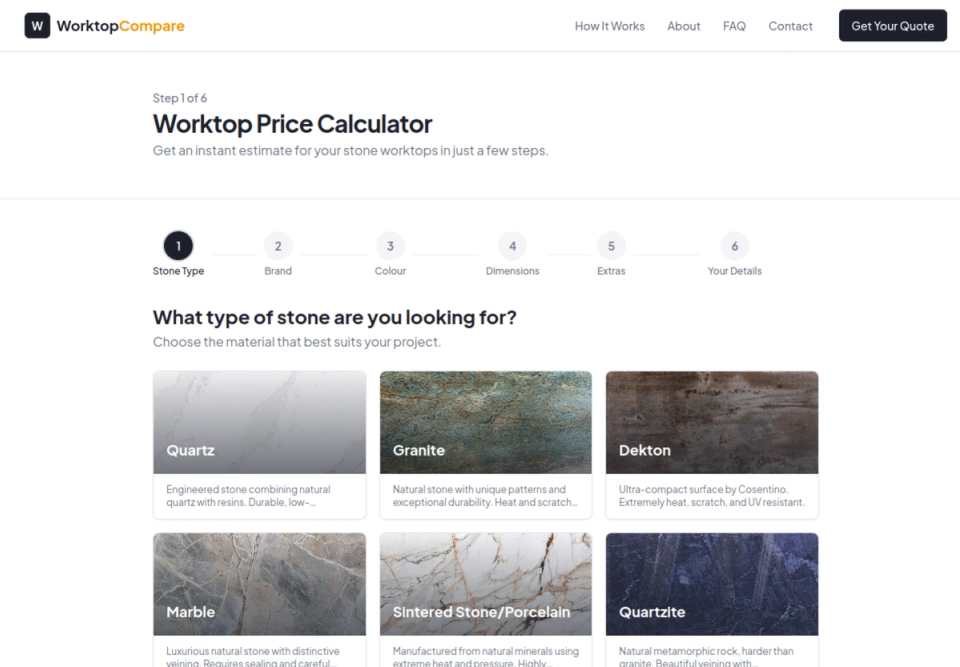
Step one of six: choose the stone.
Extras include the edge profile (from a simple pencil edge to ogee and shark nose) and details such as waterfall ends.
The standout is the dimensions step. As the homeowner types in their measurements, a live 3D model of their worktop layout builds on screen. They can drag to rotate it and zoom in, and it updates every time a number changes. They are not filling in a form; they are designing their kitchen and watching the price follow.
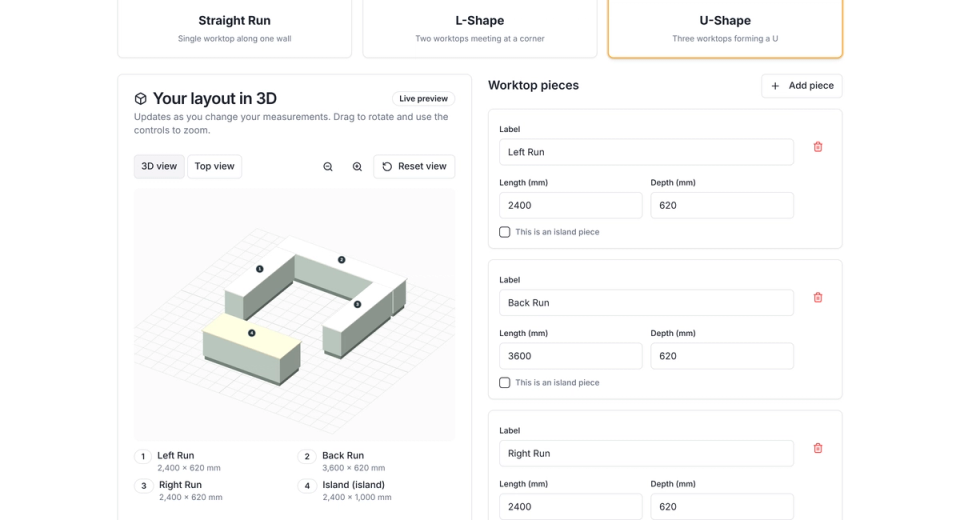
The dimensions step on Worktop Compare: a U-shaped layout with an island, rendered live from the measurements on the right.
At the end they get an estimated price range straight away, and their enquiry goes to up to five local fabricators.
Why the leads are better
This is the part we care about most, because it is where an earlier version of this idea earned its £7m.
- Every lead arrives fully specified. Stone type, brand, colour, measurements for each piece, edge profile and extras, all captured before the fabricator sees it. No chasing for a floor plan, no "can you send the sizes?" email.
- The homeowner has already seen a price. They have watched an estimate form against their own layout, so the people who complete the six steps are serious and know roughly what to expect. That filters out the browsers before they cost anyone time.
- Matched on fit, not first come. Each enquiry is matched to up to five local fabricators based on their postcode coverage and the stone types they actually work with, so a fabricator only sees jobs they can do, in an area they cover.
- Vetted on both sides. Fabricators are reviewed for workmanship, accreditations, insurance and reliability before they join, so the homeowner is handed to someone credible.
Compare that with a contact form. One gives you a name and a vague question. The other gives you a priced, measured, visualised job from a homeowner who has already committed three minutes to it.
Why AI made the 3D possible
A live 3D configurator used to be a specialist project. Sketchfab's own guide puts an end-to-end custom 3D configurator at $15,000 to $50,000, before the rest of the website. For a lead-generation site in a niche like worktops, that budget would rarely stack up, so most comparison sites settle for a form and a stock photo.
We built the whole platform, 3D preview included, in one month with five tools:
- Claude, which did most of the heavy lifting on planning, writing and checking the code, including the 3D scene.
- Lovable, an AI app builder that turns a written description into a working web app.
- Supabase, a hosted database with user accounts built in.
- Apify, a web data tool for collecting publicly available information at scale.
- ChatGPT, used alongside Claude where a second model helped.
The point is not that the code writes itself. It is that a polished, interactive interface is no longer reserved for businesses with an agency budget. The design quality that used to separate the big players from everyone else is now within reach of a small team.
What the earlier version showed
Worktop Compare is not live yet, so we are not quoting results for it. The earlier calculator we built for a client generated £7m worth of leads in 11 months. That is the value of the leads, not sales closed, and your market will differ. But it shows how much demand sits behind a simple "what will this cost me?" question when you answer it instantly, and answer it well.
What this could mean for your business
You do not need to sell worktops for this to apply. Kitchens, bathrooms, flooring, windows, garden rooms, signage, furniture: any business that quotes for made-to-measure work could let the customer build the job themselves, see it, and see a price, before a single call.
Here is an illustration on our own assumptions, not a measured result. If you price five jobs a week and each takes about two hours once you count chasing details, travel and writing it up, that is ten hours a week, around 480 hours over a working year. If a calculator hands you the details up front and screens out the browsers, much of that time comes back, and the jobs you do quote are ones the customer has already priced.
How to start on your own
- Write down your pricing logic. List the handful of things that really drive your price and a rough rate for each. If you can price a job on the back of an envelope, a calculator can do it too.
- List what you always have to chase. Those questions become the steps. Every one you answer in the calculator is one less email later.
- Add one thing the customer can see. A preview, a swatch, a drawing of their layout. It does not have to be 3D on day one, but seeing their own job is what keeps people going to the end.
- Test it on five past jobs where you know the real price, and adjust until the estimate is close. Call it an estimate and make it easy to ask for a full quote.
The takeaway
An earlier version of this idea generated £7m worth of leads in 11 months. The rebuild adds what used to cost an agency budget: a live 3D preview, real swatches and a guided price, built in a month with Claude. The result is a better lead, fully specified and pre-priced, matched to the right fabricator. If your business spends hours chasing details for people who may never buy, that is a problem worth building your way out of.


