In today’s fast-paced business environment, automation is no longer a luxury reserved for large enterprises. Small and medium-sized businesses across the UK are discovering the power of workflow automation to save time, reduce errors, and focus on growth. If you’ve been searching for an accessible n8n tutorial or wondering how no-code automation UK businesses can leverage, you’ve come to the right place.
n8n (pronounced n-eight-n) is an open-source workflow automation tool that’s revolutionising how businesses handle repetitive tasks. Unlike expensive enterprise solutions, n8n offers a fair-code approach that empowers businesses to automate processes without breaking the bank or requiring extensive coding knowledge.
Why n8n for UK Small Businesses?
The workflow automation basics are simple: connect different applications and services to work together seamlessly. According to a McKinsey report, approximately 60% of all occupations have at least 30% of activities that could be automated. For UK businesses, this represents a significant opportunity to improve efficiency and competitiveness.
n8n stands out for several reasons relevant to UK businesses:
- Self-hosted control: Keep your data within UK borders, crucial for GDPR compliance
- Cost-effective: Open-source model means no per-operation pricing
- Flexibility: Connect 400+ apps and services
- Fair-code licensing: Source code is always visible and self-hostable
For businesses looking to implement automation strategies effectively, partnering with experts like Kaizen AI Consulting can accelerate your journey and ensure best practices from day one.
Prerequisites: What You’ll Need
Before diving into your first workflow, ensure you have:
- A computer with internet access
- Basic understanding of how APIs work (helpful but not essential)
- An n8n account (cloud or self-hosted installation)
- Access to the applications you want to connect (e.g., Gmail, Slack, Google Sheets)
For this n8n tutorial, we’ll use n8n Cloud, which offers a quick start option perfect for beginners. However, the principles apply equally to self-hosted installations.
Setting Up Your n8n Account
Step 1: Create Your Account (5 minutes)
Visit n8n.cloud and sign up for a free account. The free tier is generous enough for most small business workflows, offering 5,000 workflow executions per month. Once registered, you’ll be taken to your workflow dashboard.
Step 2: Familiarise Yourself with the Interface (5 minutes)
The n8n interface consists of several key elements:
- Workflow Canvas: The central area where you build your automation
- Node Panel: Left sidebar containing all available apps and triggers
- Workflow Menu: Top menu for saving, executing, and managing workflows
- Credentials: Where you store authentication details for various services
Your First Workflow: Automated Email Notifications from Google Sheets
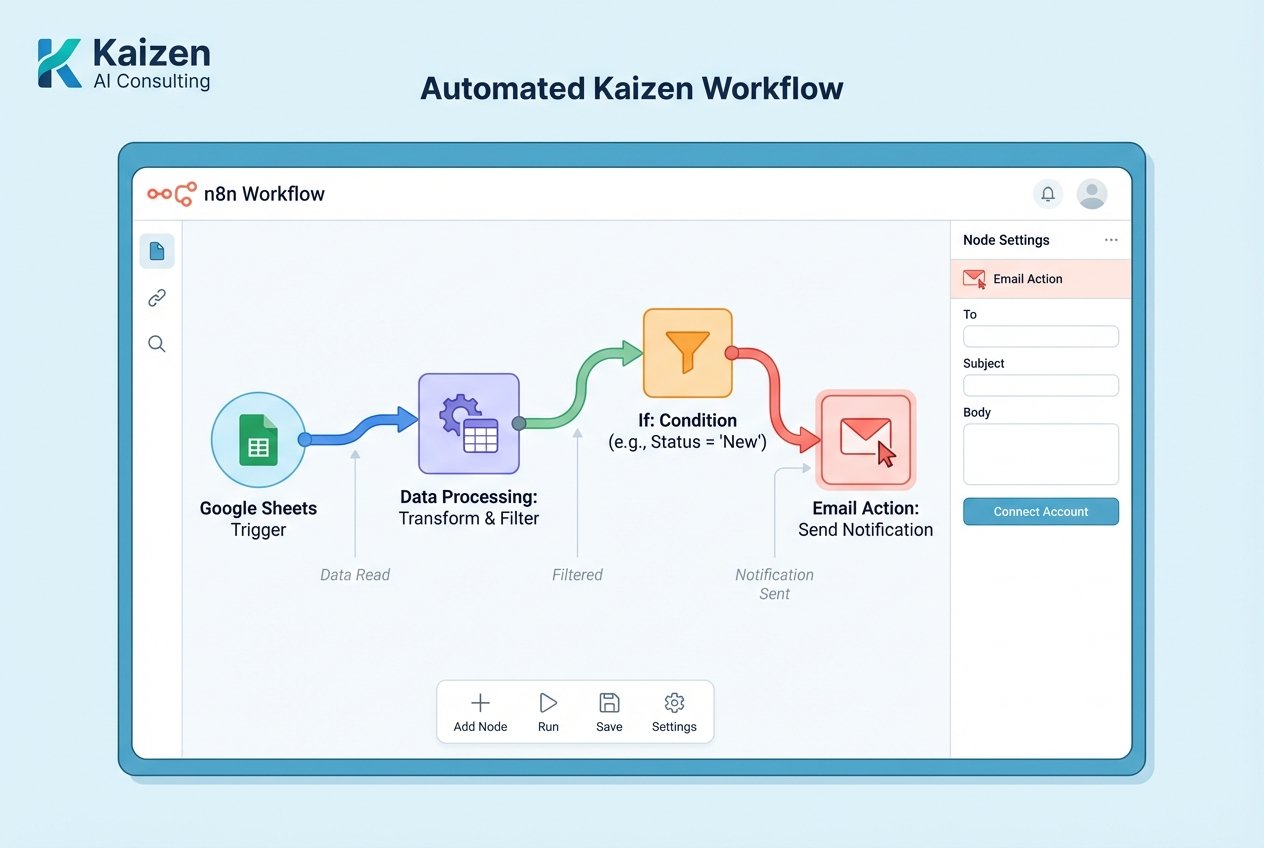
Let’s create a practical workflow that many UK businesses need: automatically sending email notifications when a new row is added to a Google Sheet. This could be for lead notifications, order confirmations, or team updates.
Step-by-Step Workflow Creation
Step 3: Add Your Trigger Node (3 minutes)
Every workflow needs a trigger. In n8n, click the plus button on the canvas and search for “Google Sheets.” Select the Google Sheets Trigger node. This node will watch for changes in your spreadsheet.
Configure the trigger:
- Choose “On Row Added” as the event
- Authenticate your Google account by clicking “Create New Credential”
- Select the specific spreadsheet and worksheet you want to monitor
According to research from Smartsheet, workers spend up to 40% of their time on manual, repetitive tasks. Automating data-triggered notifications is one of the quickest wins.
Step 4: Add Processing Logic (5 minutes)
Click the plus button after your trigger node and add a “Function” or “Set” node. This allows you to format the data from your spreadsheet before sending it. For example, you might want to:
- Format currency values with pound signs
- Combine first and last names
- Calculate totals or apply business logic
In the Function node, you can use simple JavaScript to manipulate data. For beginners, a Set node might be easier, allowing you to rename fields and set static values without coding.
Step 5: Add Your Action Node (5 minutes)
Now add the action you want to perform. Click the plus button after your processing node and search for “Gmail” (or your preferred email service). Select the Gmail node.
Configure your email:
- Authenticate your Gmail account
- Set the recipient email address
- Write a subject line (you can include data from previous nodes using expressions)
- Compose your message body, incorporating values from the spreadsheet
To use data from your Google Sheet in the email, click on any field and select the “Expression” tab. You’ll see all available data from previous nodes. For example, to include a customer name, you might use: {{$json["Customer Name"]}}
Step 6: Test Your Workflow (5 minutes)
Before activating your workflow, test it. Click “Execute Workflow” at the bottom right. n8n will run through all nodes and show you the results. Check that:
- The trigger successfully reads your Google Sheet
- Data processes correctly in your Function/Set node
- The email sends with the correct information
If you encounter errors, n8n provides detailed error messages. Most issues relate to authentication or incorrect data references.
Step 7: Activate and Monitor (2 minutes)
Once testing is successful, toggle the “Active” switch in the top right corner. Your workflow is now live and will automatically execute whenever a new row is added to your Google Sheet.
Practical Use Cases for UK Small Businesses
Now that you understand the workflow automation basics, here are proven applications for UK businesses:
1. Lead Management
Connect your website contact forms to your CRM, automatically creating leads and notifying your sales team. This reduces response times and ensures no lead falls through the cracks.
2. Invoice Processing
Automatically extract data from invoice emails, log them in accounting software, and notify relevant team members. This is particularly valuable for businesses processing numerous supplier invoices.
3. Social Media Management
Schedule and cross-post content across multiple platforms, saving hours of manual posting. Combine this with analytics tracking for comprehensive social media automation.
4. Customer Onboarding
Create sophisticated onboarding sequences that send welcome emails, create accounts in various systems, and notify team members when action is needed.
5. Inventory Alerts
Monitor stock levels and automatically reorder products or alert purchasing teams when inventory drops below thresholds.
For businesses looking to implement comprehensive automation strategies, Kaizen AI Consulting offers tailored automation solutions that go beyond basic workflows, integrating AI and advanced logic to maximise efficiency.
Common Challenges and Solutions
Authentication Issues
Many beginners struggle with connecting services. Always ensure you’re using accounts with appropriate permissions. For Google services, you may need to enable less secure app access or use OAuth2.
Data Formatting
Data from one service may not match the format expected by another. Use Set nodes, Function nodes, or n8n’s built-in expressions to transform data. The expression editor includes helpful functions for date formatting, text manipulation, and mathematical operations.
Rate Limits
APIs often have rate limits. For high-volume workflows, consider adding wait nodes or batching operations. n8n’s built-in error handling can retry failed operations automatically.
Testing in Production
Always test workflows thoroughly before activating them. Use n8n’s manual execution feature with real data samples to identify issues before they affect your business operations.
Optimising Your Workflows
Once you’ve mastered basic small business workflows, consider these optimisation techniques:
Error Handling
Add error handling branches to workflows. Use the “Error Trigger” node to capture failures and send notifications or log errors for review.
Conditional Logic
Implement IF nodes to create branching workflows. For example, send high-value orders to one team and standard orders to another.
Scheduled Workflows
Not all workflows need real-time triggers. Use the Schedule Trigger for daily reports, weekly summaries, or monthly reconciliations.
Webhook Integration
For real-time integrations, webhooks offer instant triggering. Many modern SaaS applications support webhooks, allowing near-instantaneous workflow execution.
Scaling Your Automation Strategy
As your confidence with no-code automation UK tools grows, you’ll identify numerous automation opportunities. According to UiPath’s automation research, businesses that embrace automation see an average 25% reduction in process costs and significant improvements in accuracy.
Consider creating a workflow inventory:
- List all repetitive tasks your team performs
- Identify which involve moving data between systems
- Prioritise based on time spent and error frequency
- Gradually automate, starting with simple workflows
Many UK businesses find that while they can build basic workflows independently, complex automation projects benefit from professional guidance. Kaizen AI Consulting specialises in helping businesses implement sophisticated automation strategies that integrate seamlessly with existing operations, ensuring maximum ROI from your automation investments.
Next Steps in Your Automation Journey
Congratulations! You’ve now created your first n8n workflow. This foundational knowledge opens up countless possibilities for streamlining your business operations.
To continue your automation journey:
- Explore n8n’s template library for pre-built workflows
- Join the n8n community forum to learn from other users
- Experiment with different node combinations
- Document your workflows for team reference
- Regularly review and optimise existing automations
Remember, automation is a journey, not a destination. Start small, build confidence, and gradually expand your automated processes. The time you invest in learning these workflow automation basics will pay dividends in increased efficiency and reduced operational costs.
Ready to Transform Your Business with Automation?
Whether you’re just starting with your first workflow or looking to implement enterprise-grade automation across your organisation, the right support can make all the difference. Contact Kaizen AI Consulting today to discuss how we can help you design, implement, and optimise automation workflows tailored to your unique business needs. Our team of experts specialises in helping UK businesses leverage tools like n8n, combined with AI and intelligent process automation, to achieve measurable results.
Don’t let manual processes hold your business back. The future of efficient business operations is automated, and with tools like n8n, that future is accessible to businesses of all sizes. Take the first step today, and discover how much time and money your business can save through smart automation.