Creating Automated Client Onboarding Workflows with N8N: A Complete Guide for UK Businesses
First impressions matter enormously in business. When a new client signs up for your services, the onboarding experience sets the tone for your entire relationship. Yet, according to research by Wyzowl, 86% of customers say they would be more likely to stay loyal to a business that invests in onboarding content. This is where client onboarding automation becomes not just beneficial but essential for sustainable growth.
For UK small businesses juggling multiple responsibilities, manually onboarding each client is time-consuming, error-prone, and simply unsustainable. Enter N8N, the powerful open-source automation platform that is revolutionising how businesses handle their customer journey automation. In this comprehensive guide, we will explore how to create effective automated client onboarding workflows that save time, reduce errors, and deliver exceptional client experiences.
Understanding N8N and Its Role in Business Automation
N8N (pronounced n-eight-n) is a fair-code licensed workflow automation tool that allows businesses to connect various applications and automate repetitive tasks without extensive coding knowledge. Unlike proprietary solutions, N8N offers remarkable flexibility and can be self-hosted, giving UK businesses complete control over their data, which is particularly important for GDPR compliance.
According to McKinsey research, automation technologies could raise productivity growth globally by 0.8 to 1.4 percent annually. For small businesses, this translates to significant competitive advantages and improved small business efficiency.
Why Automated Client Onboarding Matters
Before diving into the technical aspects of n8n workflows, it is crucial to understand why automated onboarding deserves your attention:
- Time Savings: Manual onboarding can take 2-4 hours per client. Automation reduces this to minutes.
- Consistency: Every client receives the same high-quality experience, regardless of team workload.
- Reduced Errors: Automated systems eliminate human error in data entry and task assignment.
- Scalability: Handle ten or one hundred new clients with the same resources.
- Better Client Experience: Immediate responses and seamless communication build trust from day one.
Research from Salesforce indicates that 80% of customers consider the experience a company provides to be as important as its products or services. Automated onboarding ensures this experience is consistently excellent.
Essential Components of an N8N Client Onboarding Workflow
Creating effective client onboarding automation requires careful planning and the right combination of triggers, actions, and integrations. Here are the core components you will need:
1. Trigger Events
Your workflow needs a starting point. Common triggers for client onboarding include:
- New form submission (via Typeform, Google Forms, or your website)
- New payment received (Stripe, PayPal, GoCardless)
- New CRM entry (HubSpot, Pipedrive, Salesforce)
- New row in Google Sheets or Airtable
- Webhook from your existing systems
2. Data Processing and Validation
Once triggered, your workflow should validate and process incoming client data. N8N allows you to:
- Check for required fields and data formats
- Standardise information (capitalisation, phone number formats)
- Enrich data with additional information from other sources
- Flag incomplete submissions for manual review
3. Multi-Channel Communication
Effective customer journey automation involves communicating through multiple channels:
- Email: Welcome messages, resource links, and next steps
- SMS: Quick confirmations and reminders (via Twilio or MessageBird)
- Slack or Microsoft Teams: Internal team notifications
- Calendar: Automatic appointment scheduling
4. Document Generation and Delivery
Automate the creation and delivery of essential documents:
- Personalised welcome packs (using Google Docs or PDF generation)
- Contracts and agreements (via PandaDoc or DocuSign integration)
- Service level agreements
- Client portals access credentials
Step-by-Step: Building Your First N8N Onboarding Workflow
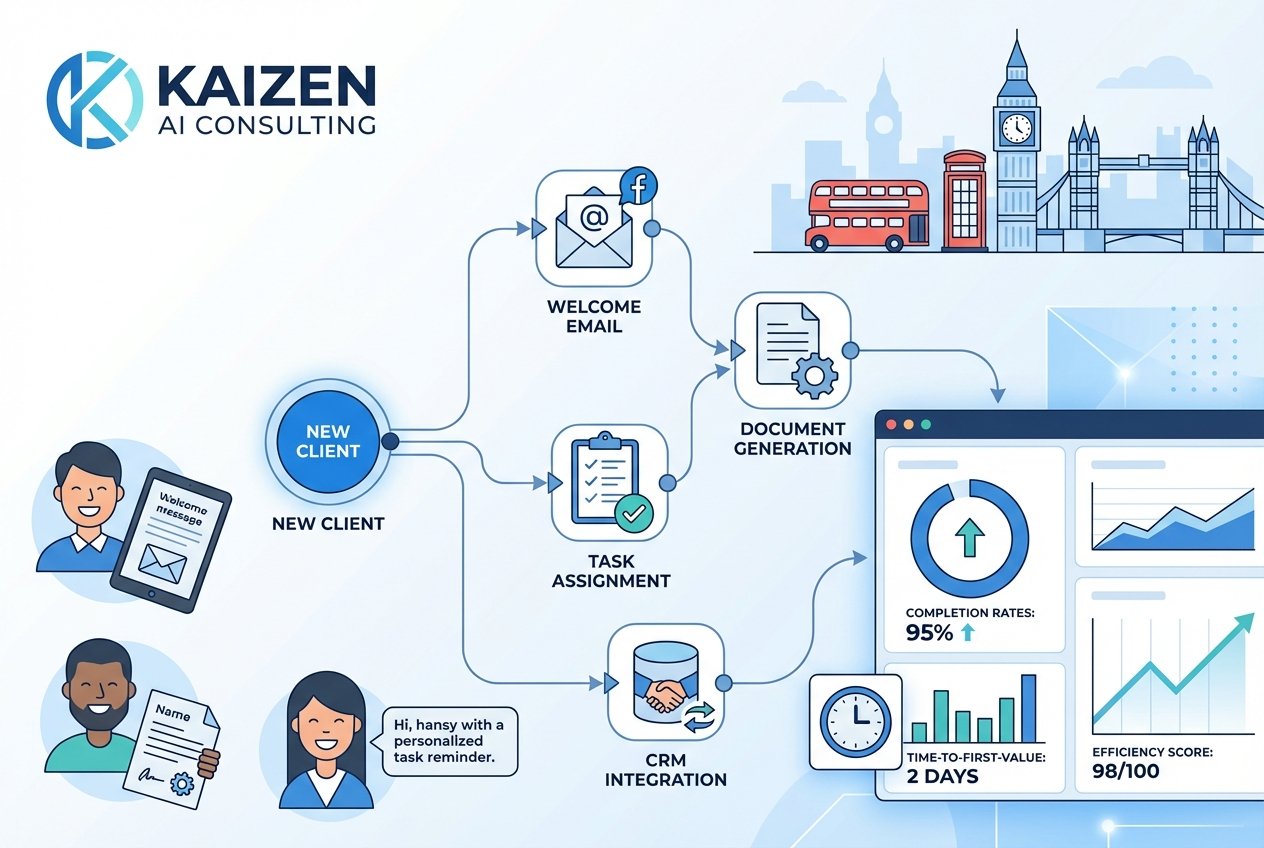
Let us walk through creating a practical n8n workflow for client onboarding. This example assumes a service-based business receiving new clients through a website form.
Step 1: Set Up Your Trigger
Begin by creating a webhook trigger in N8N. This webhook URL will receive data when a potential client completes your onboarding form. Configure your form platform to send submissions to this webhook endpoint.
Webhook Node Configuration:
- HTTP Method: POST
- Path: /new-client-onboarding
- Response Mode: Immediately
Step 2: Process and Store Client Data
Add nodes to process the incoming data:
- Set Node: Format and standardise the data
- Google Sheets/Airtable Node: Store client information in your database
- CRM Node: Create a new contact in your CRM system
Step 3: Send Welcome Communications
Configure email and messaging nodes:
- Gmail/SMTP Node: Send personalised welcome email with resources
- Twilio Node: Send SMS confirmation (optional)
- Slack Node: Notify your team about the new client
Step 4: Create Follow-Up Sequences
Use N8N’s scheduling capabilities to create timed follow-ups:
- Day 1: Welcome email with getting started guide
- Day 3: Check-in email asking if they need assistance
- Day 7: Share additional resources and schedule initial consultation
Step 5: Internal Task Assignment
Automatically create tasks for your team:
- Trello/Asana/Monday.com Node: Create onboarding task board for the client
- Google Calendar Node: Block time for initial client meeting
- Notion Node: Create client workspace from template
Advanced N8N Workflow Features for Onboarding
Once you have mastered the basics, consider these advanced features to enhance your client onboarding automation:
Conditional Logic and Branching
Not all clients are the same. Use IF nodes to create different pathways based on:
- Service tier or package selected
- Industry or business type
- Location (particularly useful for UK regional variations)
- Referral source
Error Handling and Notifications
Build resilience into your workflows:
- Set up error notifications to alert you when something fails
- Create fallback actions for when integrations are unavailable
- Log all activities for troubleshooting and compliance
Integration with AI Tools
Enhance your workflows with artificial intelligence:
- Use ChatGPT nodes to generate personalised welcome messages
- Implement sentiment analysis on client communications
- Create smart routing based on client needs
At Kaizen AI Consulting, we specialise in helping UK businesses implement sophisticated automation solutions that combine traditional workflow automation with cutting-edge AI capabilities. Our team can design custom N8N workflows tailored to your specific onboarding requirements.
Common Pitfalls to Avoid
When implementing customer journey automation, be mindful of these common mistakes:
Over-Automation
While automation improves small business efficiency, some touchpoints benefit from human interaction. Strike a balance between automated efficiency and personal connection, especially for high-value clients.
Neglecting Testing
Always test your workflows thoroughly before going live. Send test submissions through every possible scenario to identify edge cases and potential failures.
Ignoring GDPR Compliance
UK businesses must ensure their automated systems comply with data protection regulations. This includes:
- Obtaining proper consent for communications
- Providing easy opt-out mechanisms
- Securely storing and processing personal data
- Maintaining clear records of data processing activities
Forgetting to Monitor and Optimise
Automation is not a set-and-forget solution. Regularly review your workflows to:
- Identify bottlenecks or failures
- Update content and messaging
- Incorporate client feedback
- Add new integrations as your tech stack evolves
Measuring Success: Key Metrics for Onboarding Automation
Track these metrics to evaluate your n8n workflows effectiveness:
- Time to First Value: How quickly clients achieve their first success
- Onboarding Completion Rate: Percentage of clients completing all onboarding steps
- Client Satisfaction Scores: Post-onboarding survey results
- Time Saved: Hours recovered through automation
- Error Rates: Frequency of manual interventions required
According to HubSpot’s State of Marketing Report, businesses that automate lead management see a 10% or greater increase in revenue within 6-9 months. Similar results can be expected from comprehensive onboarding automation.
Getting Started with Professional Support
While N8N is designed to be accessible, creating sophisticated client onboarding automation systems requires expertise in workflow design, integration architecture, and best practices. Many UK businesses find that partnering with experienced consultants accelerates their automation journey and delivers better results.
Kaizen AI Consulting’s automation services can help you design, build, and optimise N8N workflows that transform your client onboarding process. From initial consultation to ongoing support, our team ensures your automation investment delivers measurable returns.
Conclusion: Transform Your Client Experience Today
Automated client onboarding is no longer a luxury reserved for large enterprises. With tools like N8N and the right implementation strategy, UK small businesses can deliver world-class onboarding experiences while dramatically improving operational efficiency.
The key is to start with a clear understanding of your current process, identify opportunities for automation, and build workflows that enhance rather than replace the human elements that make your business unique.
Remember, effective customer journey automation is an ongoing process of refinement and improvement, perfectly aligned with the Kaizen philosophy of continuous improvement.
Ready to transform your client onboarding process? Contact Kaizen AI Consulting today for a free consultation on how we can help you implement powerful N8N automation workflows that save time, reduce errors, and delight your clients from their very first interaction with your business.