How to Connect Your Google Business Profile to N8N for Automated Responses
Managing customer reviews and enquiries on your Google Business Profile can be incredibly time-consuming, particularly for local businesses juggling multiple responsibilities. With the rise of Google Business automation, savvy UK business owners are discovering powerful ways to streamline their customer communication whilst maintaining that essential personal touch.
In this comprehensive guide, we will walk you through connecting your Google Business Profile to N8N, a powerful workflow automation platform, enabling you to create intelligent, automated responses that save hours of manual work each week.
Why Automate Your Google Business Profile Responses?
Before diving into the technical setup, it is worth understanding why review response automation has become essential for modern businesses. According to BrightLocal’s 2024 Consumer Review Survey, 88% of consumers are likely to use a business that responds to all reviews, both positive and negative.
For local business AI solutions, the benefits are substantial:
- Time savings: Reduce response time from hours to minutes
- Consistency: Maintain professional, on-brand messaging across all interactions
- 24/7 availability: Respond to reviews even outside business hours
- Improved rankings: Google favours businesses that actively engage with customers
- Customer satisfaction: Quick responses demonstrate you value customer feedback
Research from Harvard Business School found that businesses responding to reviews see an average rating increase of 0.12 stars, which can significantly impact local search visibility.
Understanding N8N: Your Automation Powerhouse
N8N (pronounced n-eight-n) is an open-source workflow automation tool that has gained tremendous popularity among UK businesses seeking flexible, cost-effective automation solutions. Unlike proprietary platforms, n8n GMB integrations offer complete customisation without ongoing subscription costs for self-hosted instances.
Key advantages of using N8N for Google Business automation include:
- Visual workflow builder requiring minimal coding knowledge
- Over 400 native integrations with popular business tools
- Self-hosting options for data privacy compliance (important for UK GDPR requirements)
- Active community support and regular updates
- Ability to incorporate AI models for intelligent response generation
Prerequisites for Your N8N GMB Integration
Before beginning the setup process, ensure you have the following in place:
Technical Requirements
- Google Business Profile: A verified and active listing with owner or manager access
- Google Cloud Platform account: Required for API access credentials
- N8N installation: Either self-hosted or using n8n.cloud
- Basic understanding of APIs: Helpful but not essential
Account Permissions
You will need administrator access to your Google Business Profile. If you manage multiple locations, ensure you have the appropriate permissions for each listing you wish to automate.
Step-by-Step: Setting Up Google Cloud Platform Credentials
The first crucial step in your Google Business automation journey involves creating the necessary API credentials through Google Cloud Platform.
Step 1: Create a Google Cloud Project
- Navigate to the Google Cloud Console
- Click on the project dropdown at the top of the page
- Select ‘New Project’ and provide a meaningful name (e.g., ‘GBP Automation’)
- Wait for the project to be created and ensure it is selected
Step 2: Enable Required APIs
- In your project dashboard, navigate to ‘APIs and Services’ then ‘Library’
- Search for and enable the ‘Google My Business API’
- Also enable the ‘Google My Business Notifications API’ for real-time triggers
- Enable ‘Google My Business Verifications API’ if needed
Step 3: Create OAuth 2.0 Credentials
- Go to ‘APIs and Services’ then ‘Credentials’
- Click ‘Create Credentials’ and select ‘OAuth client ID’
- Configure the consent screen if prompted (External for testing)
- Select ‘Web application’ as the application type
- Add your N8N callback URL to authorised redirect URIs
- Save and note down your Client ID and Client Secret
These credentials are essential for establishing the secure connection between N8N and your Google Business Profile. At Kaizen AI Consulting, we regularly assist businesses with this technical setup, ensuring credentials are configured correctly for optimal security and functionality.
Configuring N8N for Google Business Profile Integration
With your Google Cloud credentials ready, the next phase involves setting up N8N to communicate with your Google Business Profile.
Installing the Google Business Profile Node
N8N offers community nodes for Google My Business integration. To install:
- Access your N8N instance settings
- Navigate to ‘Community Nodes’
- Search for Google Business Profile or GMB nodes
- Install the appropriate node package
- Restart your N8N instance if required
Creating Your OAuth Connection
- In N8N, create a new workflow
- Add a Google Business Profile node
- Click on ‘Credentials’ and select ‘Create New’
- Enter your Client ID and Client Secret from Google Cloud
- Complete the OAuth flow by signing in with your Google account
- Grant the necessary permissions when prompted
Building Your Review Response Automation Workflow
Now comes the exciting part – creating your automated review response automation workflow. This is where local business AI truly shines.
Basic Workflow Structure
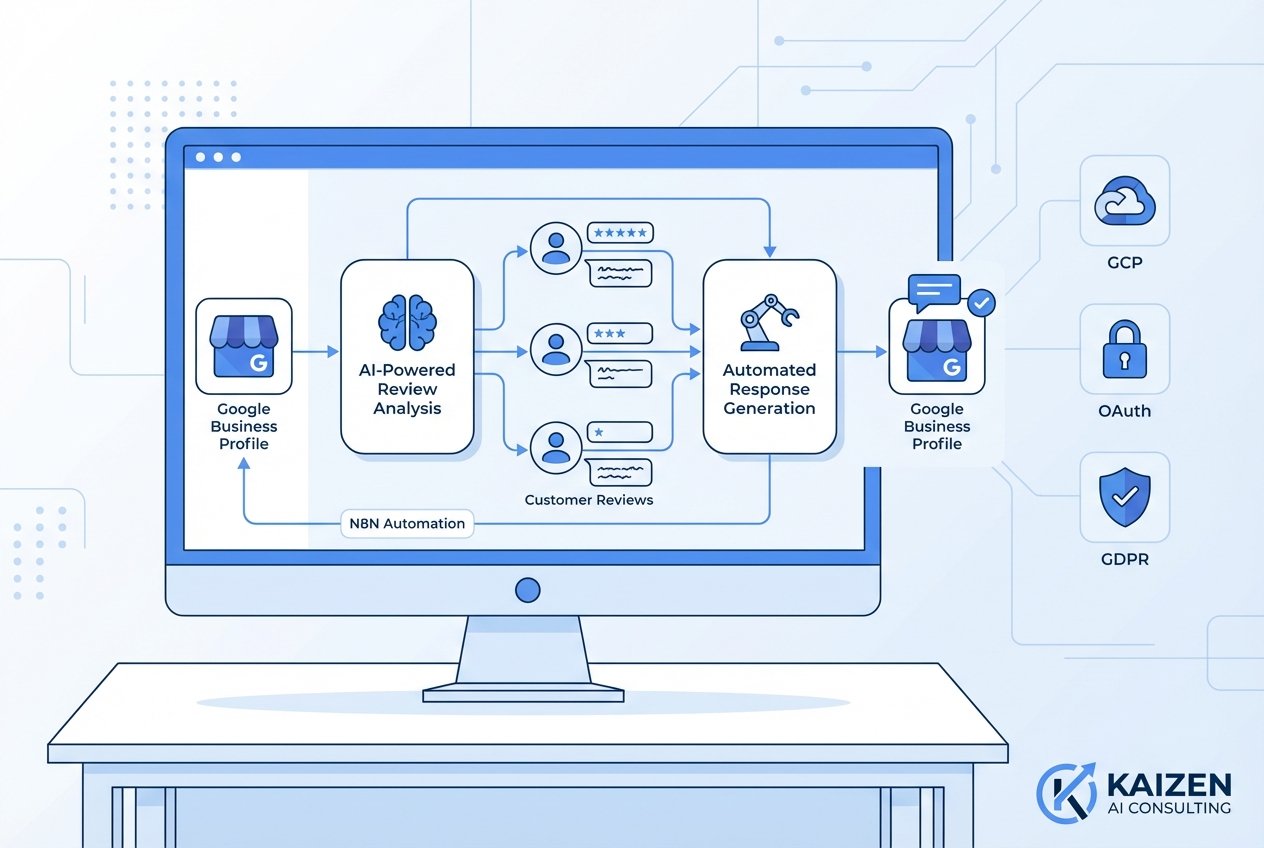
A typical N8N workflow for Google Business automation consists of:
- Trigger: Webhook or scheduled check for new reviews
- Filter: Categorise reviews by rating or content
- AI Processing: Generate appropriate response using AI
- Review: Optional human approval step
- Response: Post the reply to Google Business Profile
- Notification: Alert team members if needed
Implementing AI-Powered Responses
For intelligent, contextual responses, integrate an AI node into your workflow:
- Add an OpenAI or similar AI node after your trigger
- Configure the prompt to include the review text and your brand guidelines
- Set parameters for tone, length, and style
- Include instructions for handling negative reviews sensitively
Example prompt structure:
“You are responding to a customer review for [Business Name], a [business type] in [location]. The review states: [review_text]. Generate a professional, warm response that thanks the customer and addresses any specific points they mentioned. Keep the response under 150 words and maintain British English spelling.”
Best Practices for Automated Review Responses
Whilst automation offers tremendous efficiency, maintaining authenticity is crucial for effective Google Business automation.
Personalisation Strategies
- Always include the reviewer’s name when available
- Reference specific details from their review
- Vary your response templates to avoid repetition
- Include relevant local references for UK customers
Handling Negative Reviews
For negative reviews, consider implementing a human-in-the-loop approach:
- Flag reviews below 3 stars for manual review
- Create escalation workflows for serious complaints
- Set up Slack or email notifications for immediate attention
- Never automate responses to reviews alleging serious issues
According to ReviewTrackers, 53% of customers expect businesses to respond to negative reviews within a week, making timely automated acknowledgements valuable whilst you prepare a detailed response.
Advanced N8N GMB Automation Features
Once your basic workflow is operational, consider these advanced enhancements:
Multi-Location Management
For businesses with multiple UK locations, create workflows that:
- Route reviews to location-specific managers
- Apply location-appropriate response templates
- Track response metrics per location
- Generate consolidated reporting dashboards
Integration with CRM Systems
Connect your review response automation to your customer relationship management system:
- Log all reviews and responses in customer records
- Trigger follow-up actions based on review sentiment
- Identify repeat customers for loyalty recognition
- Track customer satisfaction trends over time
Analytics and Reporting
Build comprehensive reporting workflows that:
- Track response times and consistency
- Monitor sentiment trends across reviews
- Measure the impact on overall ratings
- Generate weekly performance summaries
Compliance and Data Protection Considerations
UK businesses must ensure their automation practices comply with relevant regulations. The Information Commissioner’s Office (ICO) provides guidance on automated processing of personal data.
Key considerations include:
- Ensuring customer data is processed lawfully
- Maintaining transparency about automated responses
- Implementing appropriate security measures
- Documenting your automation processes
Common Challenges and Solutions
API Rate Limits
Google imposes rate limits on API calls. Implement proper error handling and queuing in your N8N workflows to manage this effectively.
Authentication Token Expiry
OAuth tokens expire periodically. Set up monitoring to alert you before credentials need refreshing, preventing workflow interruptions.
Review Detection Delays
Google’s notification system may have slight delays. Consider implementing both webhook triggers and scheduled polling for comprehensive coverage.
Getting Professional Support for Your Automation Journey
Whilst this guide provides a solid foundation for n8n GMB integration, many businesses benefit from professional assistance to optimise their automation workflows. At Kaizen AI Consulting, we specialise in helping UK businesses implement sophisticated local business AI solutions that drive real results.
Our team can assist with:
- Complete N8N setup and configuration
- Custom workflow development tailored to your business needs
- AI prompt engineering for optimal response quality
- Ongoing optimisation and support
- Integration with your existing business systems
Whether you are a small local business or managing multiple locations, professional guidance ensures your automation investment delivers maximum return.
Measuring Success: Key Metrics to Track
To evaluate your Google Business automation effectiveness, monitor these metrics:
- Response time: Average time from review to response
- Response rate: Percentage of reviews receiving replies
- Rating improvement: Changes in average star rating
- Engagement: Customer interactions following responses
- Time saved: Hours reclaimed through automation
Take Your Local Business to the Next Level
Implementing review response automation through N8N represents a significant step forward in managing your online reputation efficiently. By combining the flexibility of N8N with intelligent AI responses, UK businesses can maintain exceptional customer engagement without sacrificing precious time.
Ready to transform your Google Business Profile management? Contact Kaizen AI Consulting today for a free consultation on implementing automated review responses and other AI-powered solutions for your business. Our experts are ready to help you build workflows that save time, improve customer satisfaction, and drive business growth.
The future of local business AI is here, and with the right setup, your business can respond faster, smarter, and more consistently than ever before.