
N8N Error Handling: How to Build Bulletproof Automations
Workflow automation has become the backbone of efficient UK businesses, with McKinsey reporting that organisations implementing robust automation strategies see productivity gains of up to 30%. However, the difference between a workflow that occasionally works and one that reliably delivers results lies in one critical factor: error handling.
N8n, the popular open-source workflow automation platform, offers powerful error handling capabilities that many users overlook. Whether you are automating lead generation, data synchronisation, or customer communications, understanding how to build fault-tolerant workflows is essential for maintaining business continuity and protecting your reputation.
Why Error Handling Matters for UK Businesses
In today’s competitive landscape, automation failures can have significant consequences. A failed customer onboarding workflow might leave new clients without crucial information. A broken invoice automation could delay payments and damage supplier relationships. According to Gartner research, businesses lose an average of 5-10% of revenue annually due to process failures and inefficiencies.
For UK businesses specifically, regulatory compliance adds another layer of importance. GDPR requirements mean that data processing workflows must be reliable and auditable. A workflow that fails silently could result in compliance violations and substantial fines.
Understanding N8N’s Error Handling Architecture
N8n provides several built-in mechanisms for handling errors gracefully. Before diving into implementation strategies, it is important to understand the types of errors you might encounter:
- Node execution errors: When a specific node fails to complete its task
- Connection timeouts: When external APIs or services do not respond
- Data validation errors: When incoming data does not match expected formats
- Authentication failures: When credentials expire or become invalid
- Rate limiting: When you exceed API call limits
Each error type requires a different handling approach, and robust workflows account for all possibilities.
The Error Trigger Node: Your First Line of Defence
The Error Trigger node is perhaps the most powerful tool in your n8n error handling arsenal. This special node activates whenever any workflow in your n8n instance encounters an error, allowing you to create centralised error management workflows.
Here is how to implement an effective error monitoring system:
- Create a new workflow dedicated to error handling
- Add an Error Trigger node as the starting point
- Connect notification nodes (email, Slack, Microsoft Teams) to alert your team
- Log error details to a database or spreadsheet for analysis
- Implement conditional logic to escalate critical errors
This centralised approach ensures no error goes unnoticed, regardless of which workflow encounters problems.
Implementing Try-Catch Logic in N8N Workflows
While n8n does not have traditional try-catch blocks like programming languages, you can achieve similar functionality using the Error Workflow setting combined with strategic workflow design.
Setting Up Error Workflows
Every n8n workflow has an Error Workflow setting in its options. When configured, any unhandled error in the main workflow will trigger the specified error workflow. This creates a safety net that catches failures before they cause downstream problems.
To configure this effectively:
- Open your workflow settings (click the cog icon)
- Navigate to the Error Workflow dropdown
- Select your dedicated error handling workflow
- Test by deliberately causing an error to verify the connection works
Using the IF Node for Preemptive Error Prevention
Prevention is better than cure. By using IF nodes strategically, you can validate data before it causes errors:
- Check if required fields exist before processing
- Verify data types match expectations
- Confirm API responses contain expected data structures
- Validate file formats before processing
This proactive approach to automation troubleshooting significantly reduces the number of errors that reach your error handling workflows.
Building Retry Logic for Transient Failures
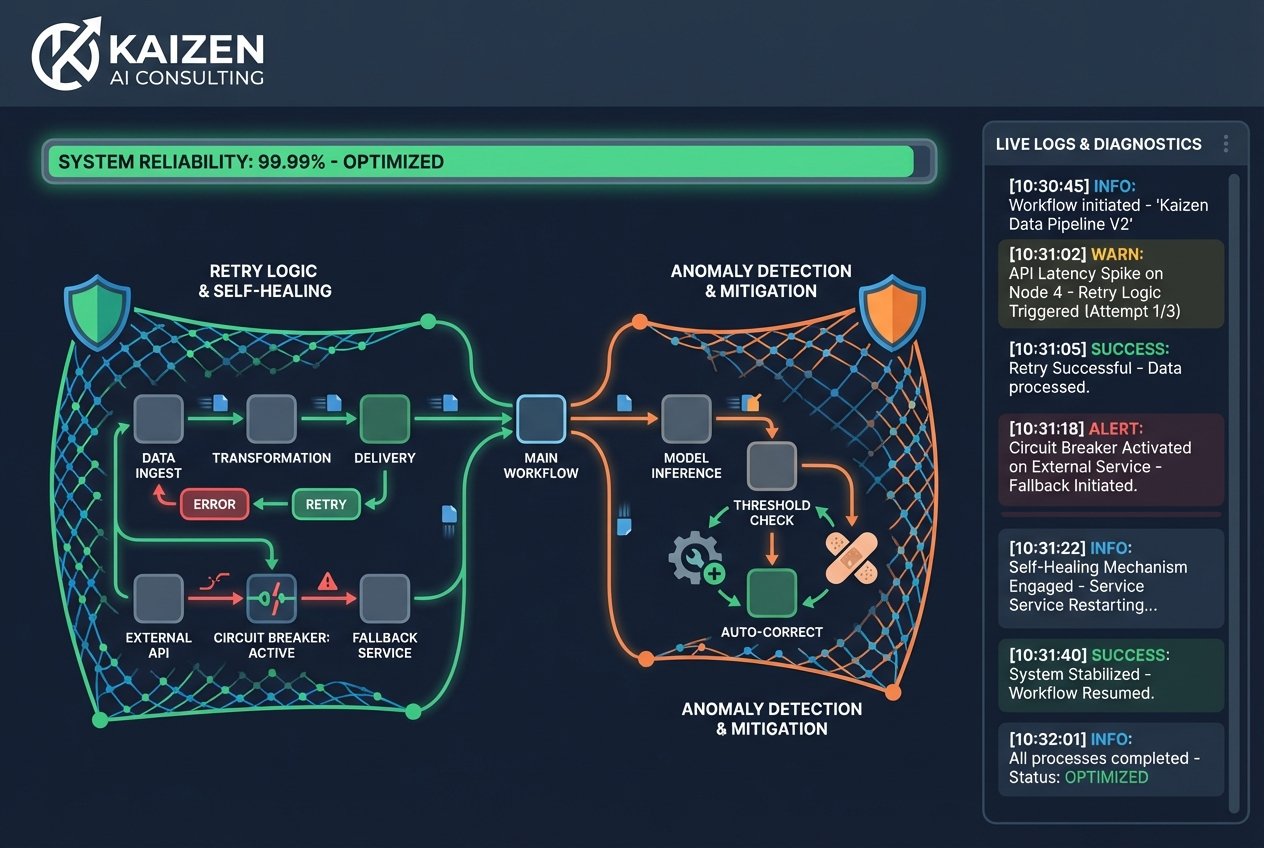
Many automation failures are temporary – API timeouts, brief service outages, or momentary network issues. Implementing retry logic can resolve these without human intervention.
N8n’s built-in retry functionality allows you to configure:
- Retry on fail: Automatically retry failed nodes
- Wait between retries: Add delays to allow services to recover
- Maximum retries: Prevent infinite loops with a retry limit
For UK businesses dealing with third-party integrations across different time zones, retry logic is particularly valuable during peak traffic periods when services may be temporarily overwhelmed.
Advanced Error Handling Techniques for Workflow Reliability
Once you have mastered the basics, these advanced techniques will elevate your robust workflows to enterprise-grade reliability.
Implementing Circuit Breaker Patterns
The circuit breaker pattern prevents your workflows from repeatedly hitting a failing service. Using n8n’s function nodes, you can implement logic that:
- Tracks consecutive failures to a specific service
- Opens the circuit (stops attempts) after a threshold is reached
- Periodically tests whether the service has recovered
- Closes the circuit (resumes normal operation) when healthy
This protects both your workflows and the external services from being overwhelmed during outages.
Creating Self-Healing Workflows
Self-healing workflows automatically resolve common issues without human intervention. Examples include:
- Refreshing expired authentication tokens
- Switching to backup API endpoints when primary ones fail
- Queueing failed items for later processing
- Scaling down request rates when rate limits are approached
At Kaizen AI Consulting, we specialise in designing these intelligent, self-healing automation architectures that dramatically reduce maintenance overhead for UK businesses.
Structured Logging for Debugging
When errors do occur, having detailed logs is invaluable for automation troubleshooting. Implement structured logging that captures:
- Timestamp of the error
- Workflow and node identifiers
- Input data that caused the failure
- Error message and stack trace
- Execution context and environment details
Store these logs in a searchable format (database, Elasticsearch, or even Google Sheets for smaller operations) to identify patterns and recurring issues.
Real-World Error Handling Scenarios
Let us examine how these principles apply to common UK business automation scenarios.
Scenario 1: CRM Integration Workflow
A workflow syncing leads from a website form to your CRM might encounter:
- Duplicate contact errors (handle by updating existing records)
- Missing required fields (handle by using default values or flagging for review)
- API rate limits (handle with queuing and delayed processing)
Scenario 2: Invoice Processing Automation
Automated invoice processing requires bulletproof error handling because financial data is involved:
- OCR extraction failures (route to manual review queue)
- Validation mismatches (flag for human verification)
- Payment gateway timeouts (implement retry with exponential backoff)
Scenario 3: Multi-Channel Marketing Automation
Marketing workflows often connect multiple platforms, multiplying potential failure points:
- Social media API changes (implement version checking and alerts)
- Email delivery failures (log bounces and update contact records)
- Analytics tracking gaps (queue events for batch processing)
Testing Your Error Handling Implementation
Building error handling is only half the battle – you must test it rigorously. Create a testing protocol that includes:
- Deliberate failure testing: Manually trigger each error type to verify handling works
- Load testing: Verify workflows handle high volumes without degradation
- Chaos engineering: Randomly disable services to test resilience
- Recovery testing: Confirm workflows resume correctly after outages
Document your test results and review them quarterly to ensure your error handling keeps pace with workflow changes.
Monitoring and Continuous Improvement
Error handling is not a set-and-forget solution. Implement ongoing monitoring to maintain workflow reliability:
- Track error rates over time to identify trends
- Set up alerts for unusual error patterns
- Conduct regular reviews of error logs
- Update handling logic as new error types emerge
For businesses seeking to maximise their automation ROI, partnering with specialists like Kaizen AI Consulting ensures your workflows receive ongoing optimisation and support. Our team helps UK organisations build, maintain, and continuously improve their automation infrastructure.
Getting Started with Professional Support
Building truly bulletproof automations requires expertise across workflow design, error handling patterns, and integration best practices. While the techniques in this guide provide a solid foundation, complex business processes often benefit from professional guidance.
If your organisation is struggling with unreliable workflows, experiencing frequent automation failures, or simply wants to ensure your n8n implementation follows best practices, contact Kaizen AI Consulting today. Our automation specialists work with UK businesses of all sizes to design resilient, scalable workflow solutions that deliver consistent results.
Conclusion
Effective n8n error handling transforms fragile automations into reliable business assets. By implementing error triggers, retry logic, self-healing patterns, and comprehensive monitoring, you create robust workflows that handle failures gracefully and keep your operations running smoothly.
Remember that error handling is an investment in business continuity. The time spent building resilient workflows pays dividends through reduced downtime, improved data quality, and greater confidence in your automation strategy. Start with the fundamentals covered in this guide, test thoroughly, and continuously refine your approach based on real-world performance data.
The journey to bulletproof automations is ongoing, but with the right techniques and potentially the right partners, your UK business can achieve the workflow reliability that drives sustainable growth.