AI Meeting Assistants: Tools That Take Notes and Create Action Items
If your working week feels like an endless cycle of back-to-back video calls, you are not alone. Research from Raconteur found that nearly one in five UK employees now spends more than 10 hours per week in virtual or in-person meetings, with one in ten exceeding 15 hours. Yet for all that time invested, how much of what is discussed is actually captured, acted upon, and followed through?
Enter meeting AI: a rapidly growing category of productivity AI tools designed to automatically transcribe conversations, generate summaries, and surface action items without anyone needing to type a single note. As Amazon Web Services reports, 64% of UK organisations are now using AI in some capacity, up from 52% the previous year, and note-taking automation is fast becoming one of the most accessible entry points for businesses exploring AI for the first time.
This guide walks you through what meeting AI tools can do, the leading platforms available to UK businesses in 2026, how to choose the right solution, and what to watch out for from a data protection perspective.
What Is a Meeting AI Assistant and How Does It Work?
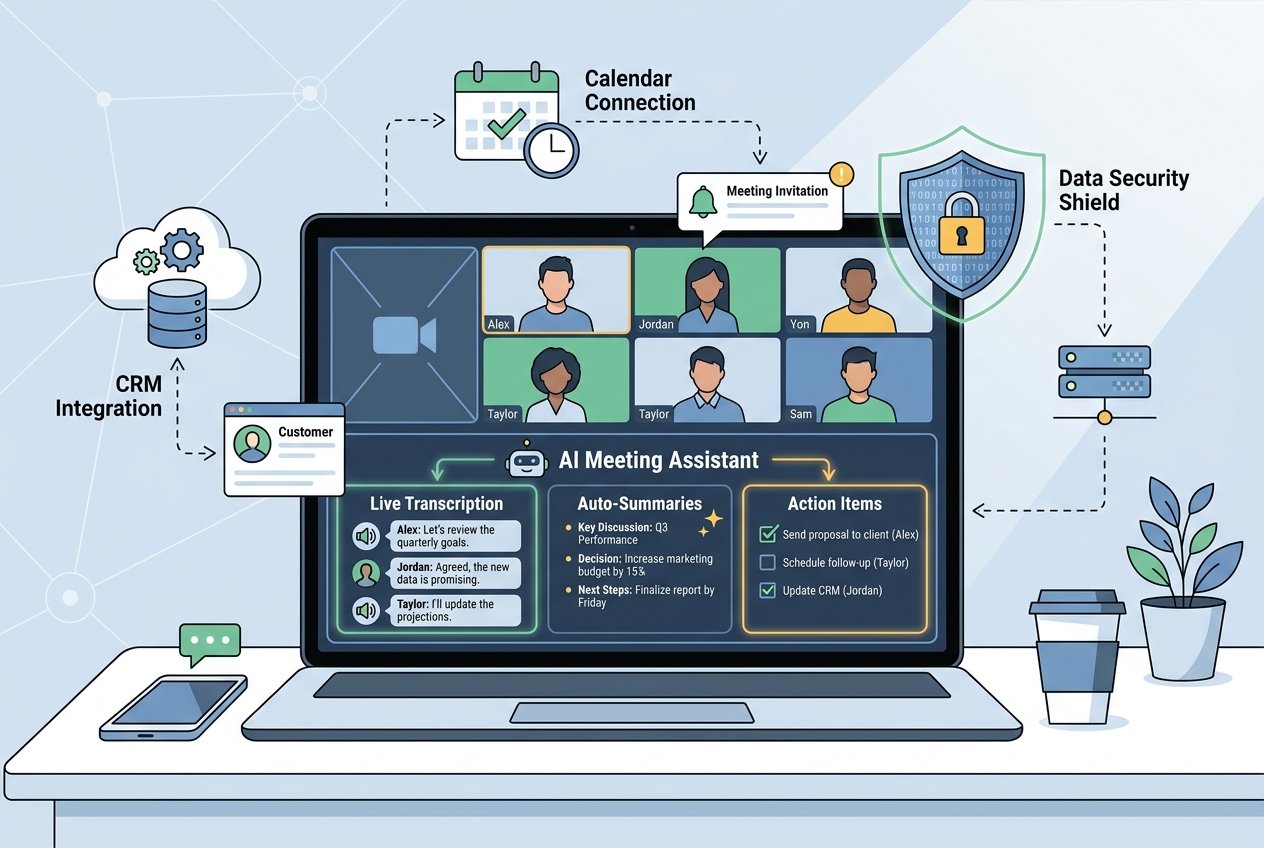
A meeting AI assistant is software that joins your video or phone calls, either as a bot participant or via a system-level audio integration, and performs a range of intelligent tasks in real time or immediately after the call ends. The core workflow typically follows this pattern:
- Recording and transcription: The tool captures everything said and converts it into a written transcript, with speaker identification so you can see exactly who said what.
- Summarisation: Using large language models, the assistant condenses a 60-minute discussion into a structured summary covering key decisions, topics discussed, and outcomes.
- Action item extraction: The AI identifies commitments made during the conversation, such as deadlines agreed, tasks assigned, and follow-ups promised, and creates a structured list that can be exported to project management tools.
- Search and retrieval: Because every meeting is indexed, teams can search across months of conversations to find a specific decision or piece of context in seconds.
These capabilities are transforming how UK teams manage knowledge, accountability, and follow-through. When connected to CRM systems, Slack, or project tools such as Asana and Notion, note-taking automation becomes a genuine workflow multiplier rather than just a convenience.
The Leading Meeting Summary Tools in 2026
The market for meeting AI has matured considerably. Here is a breakdown of the most widely used platforms and what sets each apart for UK businesses.
Fireflies.ai
Fireflies.ai is one of the most feature-rich meeting AI platforms available. Its AI bot joins your scheduled calls on Zoom, Google Meet, or Microsoft Teams and automatically generates transcripts, notes, and action items. A standout feature is AskFred, a conversational AI chatbot that lets you query your meeting library using plain language, for example asking what was agreed in last Thursday’s project review. Fireflies also offers sentiment analysis, talk-ratio metrics, and deep integrations with CRM tools like Salesforce and HubSpot, making it especially popular with sales teams. According to People Managing People, it is consistently rated as one of the best AI meeting assistant tools for teams that need searchable, structured meeting libraries.
Otter.ai
Otter.ai has long been a go-to for real-time transcription. Its OtterPilot feature automatically joins meetings, delivers live captions, and lets attendees highlight and comment on the transcript as the call unfolds. The ability to search through a live transcript mid-session is particularly useful for longer workshops and strategy days. Otter integrates natively with Zoom and offers a solid free tier, which makes it an accessible starting point for smaller UK businesses or individuals looking to try meeting summary tools without upfront cost.
Fathom
Fathom has built a strong reputation for simplicity and accuracy. It records, transcribes, and highlights key moments during calls, then generates a clean, shareable summary immediately after the meeting ends. Its free plan is notably generous, which has driven significant adoption among freelancers, consultants, and small business owners across the UK. For those who want a low-friction entry point into note-taking automation, Fathom is frequently recommended by reviewers at Zapier as a top performer for ease of use.
Microsoft Copilot for Teams
For UK businesses already embedded in the Microsoft 365 ecosystem, Copilot for Teams is the most seamless option available. It requires no additional tools, integrates directly into the Teams interface, and generates real-time meeting summaries, action items, and follow-up suggestions. Because it sits within Microsoft’s trusted data environment, many enterprise and public sector organisations in the UK find it easier to approve from a compliance perspective. It is also included with eligible Microsoft 365 Business and Enterprise subscriptions, removing an additional licensing cost.
Notion AI
While not a standalone meeting bot, Notion AI has become a powerful component of a meeting AI workflow for teams already using Notion as their knowledge base. When combined with a transcription tool, Notion AI can synthesise meeting notes alongside project documents, emails, and Slack threads, creating a unified intelligence layer across your organisation’s information. This cross-channel capability makes it particularly effective for teams who want meeting summaries to feed directly into living project plans and wikis.
Essential Features to Look For
Not all meeting AI tools are created equal. When evaluating platforms for your UK business, Paradiso AI identifies six must-have features: real-time transcription, automated summaries, action item tracking, CRM or project tool integrations, searchable archives, and privacy controls. Of these, the last point deserves particular attention for UK-based businesses.
GDPR and Data Privacy: What UK Businesses Must Consider
Using AI meeting tools in the UK introduces important obligations under the UK GDPR and the Data Protection Act 2018. Before deploying any meeting AI platform, your organisation should address the following:
- Participant consent: Recording a meeting requires clear, informed consent from all participants. Simply having a bot join a call without prior notice may not satisfy your legal obligations.
- Data storage location: Check where meeting recordings and transcripts are stored. UK businesses must ensure data processed by AI tools is handled in compliance with UK GDPR data transfer requirements, particularly for US-based providers.
- Data retention and deletion: Establish policies for how long meeting recordings are kept and ensure your chosen tool supports the right to erasure.
- Data Processing Agreements: Any AI tool that processes personal data on your behalf must have a valid Data Processing Agreement in place with your organisation.
Tools with explicit GDPR compliance certifications, pause and redact controls, and EU or UK data residency options are strongly preferable for regulated sectors such as finance, legal, and healthcare. At Kaizen AI Consulting, we help UK businesses navigate exactly these considerations, ensuring that AI tool adoption is both commercially effective and fully compliant with current data protection obligations.
The Productivity Case: What the Numbers Say
The business case for meeting AI is compelling. According to AWS research, UK businesses that have moved AI into their core processes report efficiency gains of 68%, compared to just 40% for those using AI in a more peripheral capacity. Closing this gap, the report estimates, could add as much as £35 billion to the UK economy by 2030.
For individual teams, the gains are equally tangible. Eliminating post-meeting write-ups, reducing the need for follow-up emails to confirm what was agreed, and ensuring that action items are captured and assigned in the moment rather than forgotten, these alone represent a meaningful reclamation of time for knowledge workers. For managers overseeing multiple teams, a searchable library of past meeting summaries also provides a powerful audit trail for decisions and commitments.
Despite this, the Helium42 AI Adoption Benchmark Report for 2026 notes that only 31% of UK organisations currently report a positive return on their AI investments, often because tools are adopted in isolation rather than as part of a coherent productivity strategy. This is a critical distinction: meeting AI tools deliver the greatest value when they are integrated into wider workflows and adopted with clear objectives in mind.
How to Choose the Right Meeting AI Tool for Your Business
With so many options available, selecting the right platform comes down to a handful of practical considerations:
- Your existing tech stack: If your team lives in Microsoft Teams, Copilot is the natural fit. If you use Zoom and a CRM, Fireflies or Otter may integrate more cleanly.
- Team size and budget: Fathom and Otter offer strong free tiers for smaller teams, while Fireflies and Avoma are better suited to mid-market and enterprise use cases that require analytics and CRM depth.
- Meeting types: Sales teams benefit most from conversation intelligence features, whereas project teams may prioritise clean action item extraction and integration with tools like Jira or Asana.
- Compliance requirements: Regulated industries should prioritise GDPR-certified tools with UK or EU data residency and strong access controls.
- Ease of adoption: The best tool is one your team will actually use. A complex platform with a steep learning curve will struggle to gain traction, regardless of its feature set.
If you are unsure where to start or want to ensure your AI tool selection aligns with a broader digital transformation strategy, the team at Kaizen AI Consulting offers structured guidance on AI tool selection, implementation, and integration for UK businesses of all sizes. Getting this right from the outset saves significant time and cost further down the line.
Making the Most of Your Meeting AI Investment
Deploying a meeting AI tool is just the beginning. To maximise the value of note-taking automation, UK businesses should consider the following best practices:
- Define what good looks like: Agree on a standard structure for meeting summaries so that the AI output is consistent and actionable across your organisation.
- Connect outputs to workflows: Integrate your meeting AI tool with your project management and CRM systems so that action items flow automatically into the right places rather than sitting in a separate inbox.
- Train your team: Ensure everyone understands how to use the tool, what is being recorded, and how to access and search the meeting archive.
- Review and iterate: Meeting AI summaries are not perfect out of the box. Regularly reviewing outputs and adjusting prompt templates or summary settings improves quality over time.
- Use analytics: Tools like Fireflies offer insights into speaking time, topic frequency, and meeting efficiency. These metrics can inform better meeting culture, not just better note-taking.
The Future of Meeting AI in UK Workplaces
Meeting AI is still maturing. The next wave of development is moving beyond transcription and summaries into proactive intelligence: tools that flag when a commitment has not been followed up, suggest agenda items based on outstanding action items, or automatically brief you before a meeting using context from previous conversations and connected documents. For UK businesses navigating hybrid working, distributed teams, and increasing pressure to do more with less, these capabilities represent a genuine competitive advantage.
As ONS data from January 2026 shows, around 25% of UK businesses were already using AI in late 2025, up 15 percentage points since 2023, and adoption is only accelerating. The question for most UK businesses is no longer whether to adopt productivity AI tools, but how to adopt them intelligently and extract the maximum return.
Ready to bring smarter meeting practices to your organisation? Get in touch with the team at Kaizen AI Consulting to explore how note-taking automation and broader AI productivity tools can be implemented in a way that fits your business, your team, and your compliance requirements. Our consultants work with UK businesses across a range of sectors to identify, deploy, and optimise AI tools that deliver measurable results.