The landscape of marketing video creation has transformed dramatically in 2026, with AI-powered tools enabling businesses to produce professional product demo videos in minutes rather than weeks. At the forefront of this revolution is Google’s VEO 3.1, accessible through Google AI Studio, offering UK businesses unprecedented capabilities to create compelling AI product videos without extensive technical expertise or substantial budgets.
According to recent industry data, 78% of marketing teams now use AI-generated video in at least one campaign per quarter, with product demos and explainer videos representing 31% of all AI video output. For UK businesses looking to capitalise on this trend, understanding how to leverage VEO 3.1 effectively can provide a significant competitive advantage in marketing video creation.
Understanding VEO 3.1 and Google AI Studio
VEO 3.1, released by Google DeepMind in January 2026, represents a significant leap forward in AI video generation technology. This powerful model enables users to create cinematic-quality videos from text prompts, reference images, or a combination of both. The platform excels at understanding camera movement, lighting, and composition, producing results that feel polished and professional.
Google AI Studio serves as the primary interface for accessing VEO 3.1, providing a user-friendly environment where businesses can experiment with video generation without requiring coding knowledge. The platform is available through various Google services, including the Gemini app, YouTube Shorts, Google Vids, and for developers through the Gemini API and Vertex AI.
Key Features of VEO 3.1 for Product Demo Videos
The latest VEO 3.1 update introduces several groundbreaking features particularly valuable for creating product demonstration content:
Ingredients to Video: This feature allows you to upload up to three reference images of your product, characters, or scenes. VEO 3.1 then generates videos that maintain consistency across these elements, ensuring your product appears identical throughout the demonstration. This is particularly valuable for e-commerce brands requiring uniform product presentation.
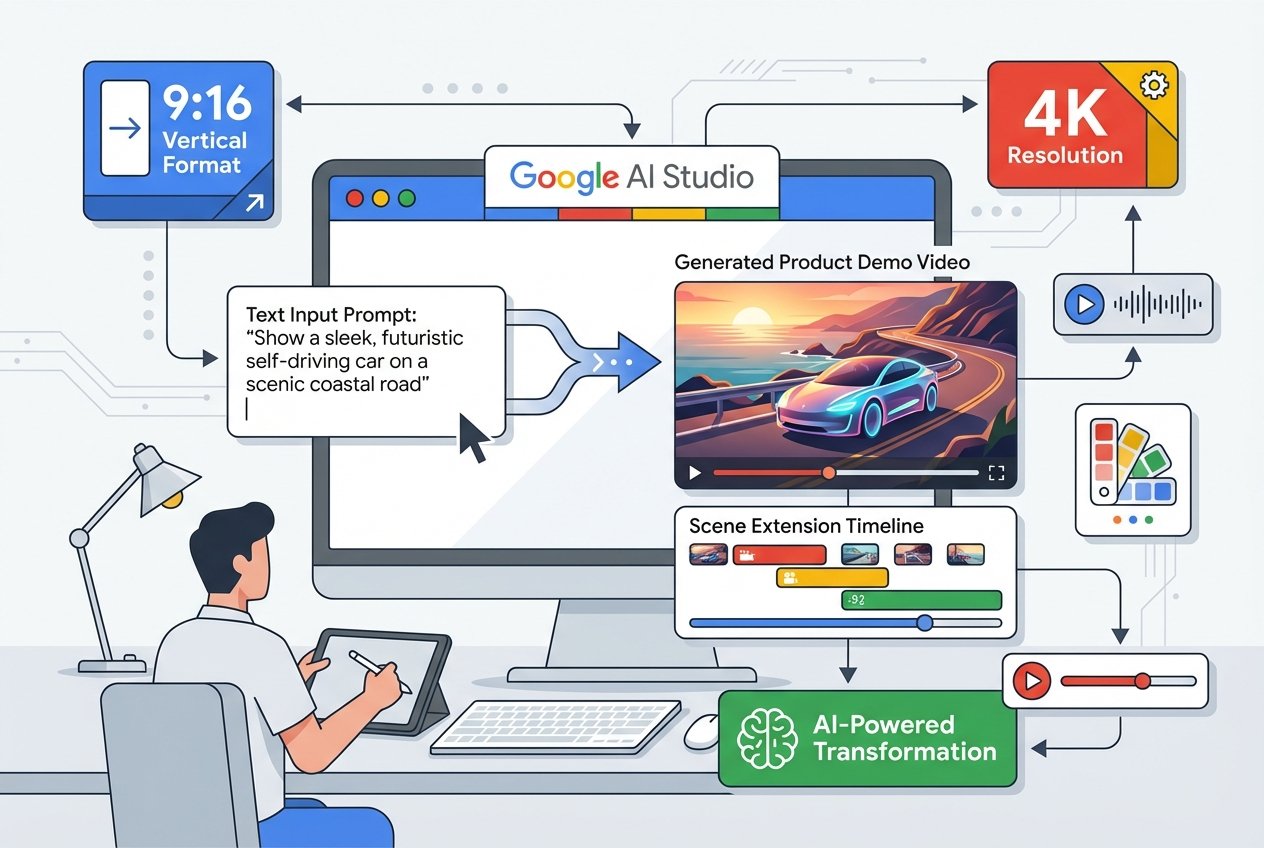
Native Vertical Format: With native 9:16 aspect ratio support, you can create product demos specifically optimised for YouTube Shorts, TikTok, and Instagram Reels without quality loss from cropping. Research indicates that vertical format now accounts for 59% of AI-generated videos.
4K Upscaling: VEO 3.1 supports upscaling to 1080p and 4K resolution, enabling broadcast-quality output suitable for professional marketing campaigns. This ensures your product demos meet the highest visual standards expected by UK consumers.
Native Audio Generation: Unlike previous models, VEO 3.1 generates synchronised audio alongside video, including sound effects, ambient noise, and even dialogue. This eliminates the need for separate audio production workflows.
Step-by-Step VEO 3.1 Tutorial for Product Demos
Step 1: Access Google AI Studio
Navigate to Google AI Studio and sign in with your Google account. If you are using the Gemini app on mobile, you can access VEO 3.1 directly through the video generation feature. For business users, Google Workspace Business and Enterprise plans include access to VEO 3.1 through Google Vids.
Step 2: Prepare Your Product Assets
Before generating your product demo video, gather high-quality images of your product from multiple angles. VEO 3.1’s Ingredients to Video feature works best when you provide clear reference images that showcase your product’s key features. Consider including:
- A main product shot against a clean background
- Detail shots highlighting specific features
- Lifestyle images showing the product in use
Step 3: Craft Your Video Prompt
The quality of your AI product video depends significantly on your prompt. For effective product demos, include specific details about camera movements, lighting, and the actions you want depicted. Here is an example prompt structure:
“A cinematic product demonstration video showing [product name] on a minimalist white surface. The camera slowly pans around the product, highlighting [specific feature]. Natural lighting creates soft shadows. Professional, high-energy electronic music plays in the background. 4K quality, commercial style.”
Step 4: Configure Generation Settings
In Google AI Studio, select the VEO 3.1 model and configure your settings:
- Aspect Ratio: Choose 16:9 for landscape or 9:16 for vertical social media content
- Video Length: Select from 4, 6, or 8 seconds per clip
- Resolution: Select 720p for quick iterations or 1080p/4K for final production
- Audio: Enable native audio generation for sound effects and background music
Step 5: Upload Reference Images
If using the Ingredients to Video feature, upload your product images as reference assets. VEO 3.1 will maintain visual consistency with these references throughout the generated video. For product demos, this ensures your actual product appears in the video rather than an AI interpretation.
Step 6: Generate and Iterate
Click generate and wait for VEO 3.1 to process your request. Generation typically takes between 30 seconds and several minutes depending on complexity and resolution. Review the output and refine your prompt as needed. VEO 3.1 allows multiple generations, so experiment with different approaches to find the most effective presentation for your product.
Advanced Techniques for Professional Product Demos
Using Scene Extension for Longer Videos
VEO 3.1’s Scene Extension feature enables you to create longer product demonstrations by extending existing clips. The AI uses the final second of your previous video to generate seamlessly connected new content, maintaining visual and audio consistency. This is ideal for comprehensive product walkthroughs that require more than 8 seconds.
First and Last Frame Control
For precise creative control, use the First and Last Frame feature. Provide starting and ending images, and VEO 3.1 generates smooth transitions between them. This is particularly effective for before-and-after demonstrations or showing product transformation.
Leveraging Gemini for Prompt Enhancement
Since VEO 3.1 operates within the Gemini ecosystem, you can use Gemini AI to help refine your prompts. Simply ask Gemini to improve your video generation prompt, and it will suggest more detailed, effective descriptions that yield better results.
Cost Considerations for UK Businesses
Understanding the economics of AI video generation is crucial for UK marketing teams. According to industry research, AI video tools reduce average production costs by 91% compared to traditional video production, bringing costs from approximately 3,600 GBP per minute down to around 320 GBP per minute.
VEO 3.1 access varies by platform:
- Google AI Pro: Includes VEO 3.1 access with monthly credit allocations
- Google Workspace: Business and Enterprise plans include Google Vids with VEO 3.1 capabilities
- Gemini API: Pay-per-use model for developers, with VEO 3.1 Fast available at lower credit costs
For UK businesses managing multiple product lines, the efficiency gains are substantial. Marketing teams using AI video report producing 11 times more content per month with the same team size, whilst A/B testing costs 96% less than traditional methods.
Best Practices for UK Marketing Compliance
When using AI-generated product demo videos for UK marketing, consider these compliance factors:
AI Content Transparency: VEO 3.1 automatically embeds SynthID digital watermarks in all generated content, supporting transparency requirements. The Gemini app also allows verification of whether content was AI-generated.
Advertising Standards: Ensure your product demos accurately represent your products. Whilst AI can enhance presentation, claims made must be substantiated under ASA guidelines.
Data Protection: When using customer images or data in AI video generation, ensure GDPR compliance. Google’s enterprise offerings include appropriate data processing agreements for UK businesses.
Integrating AI Product Videos into Your Marketing Strategy
The true power of VEO 3.1 emerges when integrated into a comprehensive marketing strategy. UK businesses are finding success using AI product videos across multiple channels:
E-commerce Listings: Research shows that AI-generated product demonstration videos boost conversion rates by 40%. Adding VEO 3.1 videos to product pages can significantly impact sales performance.
Social Media Campaigns: Short-form AI videos generate 2.7 times more engagement than static content. Use VEO 3.1’s native vertical format for platform-optimised content.
Email Marketing: AI-personalised video emails achieve 4.1 times higher click-through rates than standard video emails.
For businesses seeking to maximise their AI video marketing impact, working with specialists who understand both the technology and strategic implementation can accelerate results. Kaizen AI Consulting offers comprehensive support for UK businesses looking to integrate AI video tools into their marketing workflows, from initial strategy development through to implementation and optimisation.
Common Challenges and Solutions
Maintaining Brand Consistency
One challenge with AI video generation is ensuring outputs align with brand guidelines. Solution: Create a library of brand-specific reference images and develop standardised prompt templates that incorporate your brand voice and visual style.
Achieving Photorealistic Results
Whilst VEO 3.1 produces impressive results, some outputs may require refinement. Solution: Use the iteration approach, generating multiple versions and selecting the best elements. Combine with traditional editing tools for final polish.
Managing Generation Costs
High-volume production can accumulate costs quickly. Solution: Use lower resolutions (720p) for testing and iteration, reserving 1080p and 4K for final productions. Consider VEO 3.1 Fast for rapid prototyping at lower credit costs.
The Future of AI Product Videos
The AI video generation market is projected to reach 18.6 billion USD by the end of 2026, with UK businesses leading European adoption. As tools like VEO 3.1 continue to evolve, we can expect even more sophisticated capabilities including real-time generation, enhanced personalisation, and longer-form content creation.
For UK businesses, the message is clear: AI video generation has moved from experimental novelty to essential marketing tool. Those who master platforms like VEO 3.1 and Google AI Studio now will be well-positioned to capitalise on this transformation.
Getting Started Today
Creating professional product demo videos with VEO 3.1 is more accessible than ever. Begin by experimenting with simple prompts and gradually incorporate advanced features as you become familiar with the platform. Remember that the most effective AI videos combine technological capability with strategic marketing thinking.
Whether you are a small e-commerce business creating your first product videos or an established brand scaling your video marketing operation, VEO 3.1 offers the tools to compete effectively in today’s video-first digital landscape.
Ready to transform your product marketing with AI-generated videos? Contact Kaizen AI Consulting to discover how we can help your UK business leverage VEO 3.1 and other cutting-edge AI tools to create compelling product demonstrations that drive engagement and conversions. Our team specialises in helping businesses implement AI marketing solutions that deliver measurable results.