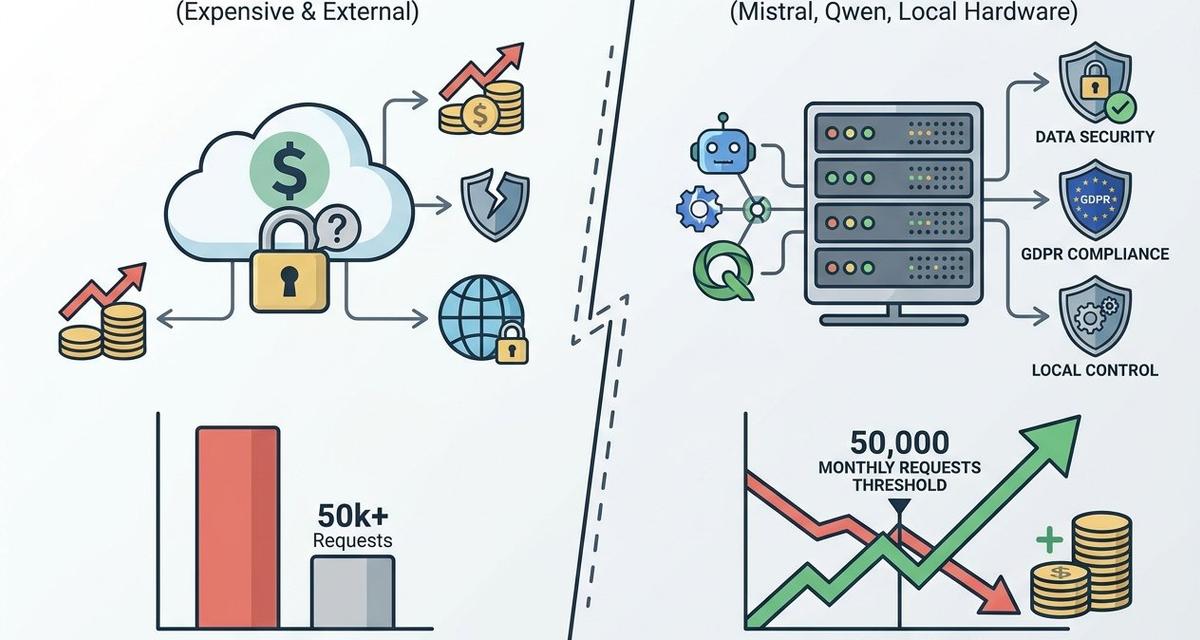
For UK businesses watching their AI budgets climb month after month, there is a powerful alternative hiding in plain sight. Running AI locally using open-source models can dramatically reduce costs, strengthen data privacy, and give your organisation complete control over its AI capabilities. In 2026, the technology has matured to the point where on-premise AI is no longer the preserve of tech giants. It is a realistic, cost-effective option for small and medium-sized enterprises across the country.
In this guide, we explore how local AI business solutions work, which open source AI tools are leading the way, and how your company can start saving money today.
What Does Running AI Locally Actually Mean?
Running AI locally means deploying large language models (LLMs) and other AI tools directly on your own hardware, whether that is a dedicated server, a high-specification workstation, or even a modern laptop. Unlike cloud-based services such as OpenAI or Google Gemini, where data is sent to external servers for processing, on-premise AI keeps everything within your network.
This approach offers three core advantages:
- Zero per-token costs – once the hardware is in place, there are no ongoing API fees
- Complete data privacy – sensitive business data never leaves your premises
- Full control – you choose which models to run, how to fine-tune them, and when to update
According to Webvise’s 2026 analysis, the performance gap between local and cloud models has narrowed significantly, making this a genuine alternative for most business use cases.
The Open Source AI Tools Leading the Way in 2026
The open-source AI landscape has exploded with capable models that rival proprietary offerings. Here are the standout open source AI tools available for local deployment right now:
Qwen3 – Best All-Round Local Model
Alibaba’s Qwen3 family, available under the permissive Apache 2.0 licence, offers models ranging from 0.6 billion to 235 billion parameters. As ranked by Hugging Face in June 2026, Qwen3 is the best overall local LLM family for its strong reasoning, coding capabilities, and multilingual support. For UK businesses handling international correspondence, this versatility is invaluable.
Mistral Small 3 – Speed Meets Performance
French AI company Mistral released Small 3, a 24-billion-parameter model that delivers performance comparable to Meta’s Llama 3.3 70B whilst running at 2.5 times faster inference speeds. It requires just 16GB of RAM, making it accessible on mid-range business hardware. The Apache 2.0 licence means there are no commercial restrictions on how you use it.
Llama 4 Scout – Enterprise-Grade Open Weight
Meta’s Llama 4 Scout uses a Mixture-of-Experts architecture with 17 billion active parameters out of 109 billion total. Its standout feature is a 10-million-token context window, ideal for businesses that need to process lengthy contracts, reports, or datasets. However, it does require more substantial hardware, typically 48GB of RAM or more.
Phi-4 Mini – Perfect for Limited Hardware
Microsoft’s Phi-4 Mini packs impressive capability into just 3.8 billion parameters, requiring only 4GB of RAM. For businesses wanting to test the waters with local AI without significant hardware investment, this is the ideal starting point.
How Ollama Makes Local AI Accessible for Every Business
If these model names and parameter counts feel overwhelming, that is where Ollama comes in. Ollama is a free, open-source tool that simplifies the entire process of downloading, running, and managing AI models locally. With over 174,000 GitHub stars as of mid-2026, it has become the de facto standard for Ollama business deployments.
Here is why Ollama is transformative for local AI business adoption:
- One-command installation – get up and running in minutes, not days
- OpenAI-compatible API – existing tools and integrations work seamlessly
- Automatic quantisation – models are optimised to run efficiently on your specific hardware
- GPU acceleration – takes full advantage of available graphics processing power
For non-technical teams, complementary tools like LM Studio and Open WebUI provide polished graphical interfaces that make interacting with local models feel just like using ChatGPT, but entirely on your own systems.
The Cost Savings: Local AI vs Cloud APIs
The financial case for cost-effective AI models running locally becomes compelling at scale. Here is how the numbers break down:
Cloud API costs in 2026: OpenAI’s GPT-4.1 costs approximately $0.03 per 1,000 input tokens, whilst Google Gemini 1.5 Pro sits at around $0.0035 per 1,000 tokens. For a business generating one million tokens per day, that translates to between $30 and $300 daily, or roughly 290 to 2,900 GBP per month.
Local AI costs: Upfront hardware investment ranges from 1,500 to 12,000 GBP depending on requirements, plus minimal electricity costs of approximately 0.02 GBP per hour for GPU operation. Crucially, there are zero per-token fees.
According to industry analysis, the break-even point typically sits at around 50,000 requests per month. Below this threshold, cloud APIs may prove more economical. Above it, local deployment pays for itself rapidly, often within six to twelve months.
For businesses currently spending several hundred pounds monthly on AI API subscriptions, the savings over a three-year period can easily reach five figures. This is precisely the kind of strategic technology investment where working with specialists like Kaizen AI Consulting can help you make the right choices from the outset, avoiding costly mistakes and ensuring your setup is optimised for your specific workflows.
GDPR and Data Privacy: Why UK Businesses Should Care
Beyond cost savings, on-premise AI addresses one of the most pressing concerns for UK businesses: data protection compliance. With the EU AI Act reaching full enforcement on 2 August 2026 and the ICO intensifying scrutiny of automated decision-making, keeping AI processing in-house offers significant regulatory advantages.
The ICO’s March 2026 analysis on agentic AI emphasised that all AI systems must comply with UK GDPR requirements, particularly around automated decision-making and special category data. Local deployment directly supports compliance by:
- Eliminating cross-border data transfers – no personal data leaves your UK infrastructure
- Supporting data minimisation – you process only what is necessary, in a controlled environment
- Enabling the right to be forgotten – you retain full control over model data and can retrain as needed
- Simplifying Data Protection Impact Assessments – auditing is straightforward when everything is on your own systems
For regulated industries such as healthcare, legal services, and financial services, these benefits are not merely convenient; they are increasingly becoming a compliance baseline.
What Hardware Do You Actually Need?
One of the most common misconceptions about running AI locally is that it requires enterprise-grade data centre equipment. In reality, the hardware requirements in 2026 are surprisingly accessible:
Entry level (models up to 7B parameters): A modern laptop or desktop with 16GB RAM and a consumer GPU such as an NVIDIA RTX 3060 with 12GB VRAM. Budget: approximately 800 to 1,200 GBP. Suitable for email drafting, summarisation, and basic customer query handling.
Mid-range (models up to 24B parameters): A workstation with 32GB RAM and an RTX 4070 or 4080 GPU. Budget: approximately 2,000 to 4,000 GBP. Handles coding assistance, document analysis, and content generation with ease.
Advanced (models up to 70B+ parameters): A high-end workstation with 64 to 128GB RAM and an RTX 4090 or equivalent. Budget: approximately 5,000 to 12,000 GBP. Enterprise-grade performance for complex reasoning, large document processing, and multi-user environments.
Many businesses already own hardware capable of running smaller models. Before investing in new equipment, it is worth testing what your existing infrastructure can handle.
Practical Use Cases for UK Businesses
According to a 2026 survey of small business AI usage, the most common applications include:
- Content generation – blog posts, social media copy, and marketing materials
- Customer communication – drafting replies, handling enquiries, and producing FAQ responses
- Administrative tasks – meeting summaries, email drafting, and report generation
- Document processing – contract review, data extraction, and compliance checking
- Code assistance – internal tool development, automation scripts, and debugging
All of these tasks can be handled effectively by locally deployed models, often with quality that is indistinguishable from cloud-based alternatives for routine business operations.
Getting Started: A Practical Roadmap
Transitioning to local AI does not need to happen overnight. Here is a sensible four-week approach:
Week 1: Evaluate and experiment. Install Ollama on an existing machine and test two or three models against your real business tasks. Phi-4 Mini is an excellent starting point for limited hardware.
Week 2: Compare outputs. Run the same prompts through your current cloud AI service and your local models. Document quality differences, speed variations, and any capability gaps.
Week 3: Calculate your business case. Tally your current monthly AI spending, project your local running costs, and identify the break-even timeline.
Week 4: Plan your deployment. Decide which workflows to migrate first, identify any hardware upgrades needed, and establish your ongoing model update process.
For businesses that want expert guidance through this process, Kaizen AI Consulting’s AI Implementation and Integration service is designed to help organisations navigate exactly this kind of strategic technology transition, ensuring you maximise savings whilst maintaining output quality.
The Bottom Line
The era of expensive, opaque cloud AI as the only option is over. Open-source models running locally offer UK businesses a path to significant cost savings, stronger data privacy, and genuine technological independence. With tools like Ollama making deployment accessible and models like Qwen3, Mistral Small 3, and Phi-4 Mini delivering impressive performance, there has never been a better time to explore on-premise AI.
The businesses that act now will build internal AI capabilities and expertise that compound over time, creating a lasting competitive advantage. Those that continue paying escalating API fees risk falling behind.
Ready to explore how local AI could transform your business operations and reduce costs? Get in touch with Kaizen AI Consulting today for a no-obligation consultation on building your on-premise AI strategy. You can also explore our about page to learn more about how we help UK businesses harness the power of AI.


