Artificial intelligence is no longer a tool reserved for tech giants. Across the UK, businesses of every size are embedding AI into their daily workflows, and the numbers back this up. According to the UK Government’s AI Adoption Research (2026), 75% of businesses using AI reported improved workforce productivity, and 57% developed new or improved processes as a direct result. Yet one of the most underused capabilities available right now sits inside Claude by Anthropic: a feature called Claude Projects.
If you have been using Claude as a one-off chat tool, you are leaving significant value on the table. Claude Projects transforms the platform from a reactive chatbot into a structured, persistent AI knowledge workspace tailored to your business. This guide explains exactly what Claude Projects is, how to set it up effectively, and how UK businesses can use it to achieve measurable productivity gains.
What Are Claude Projects?
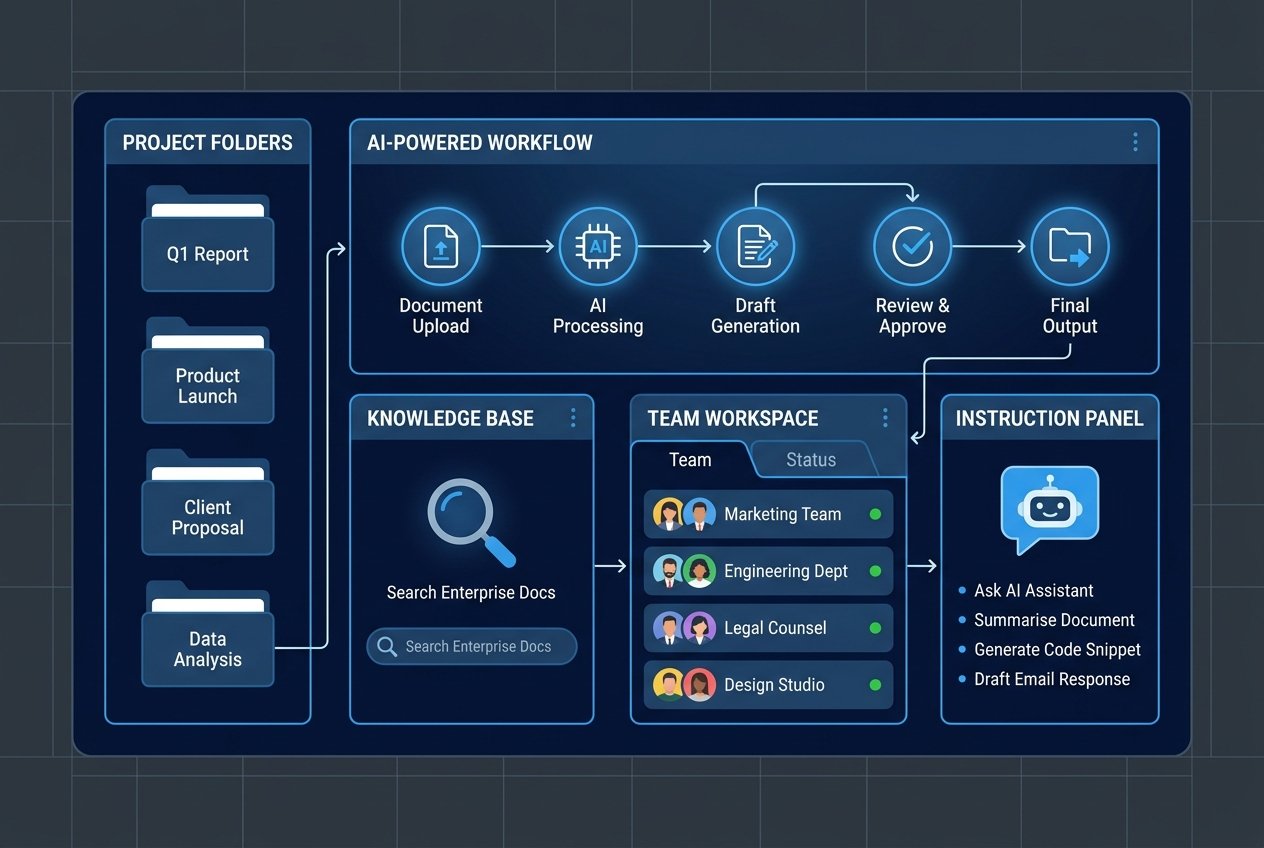
Claude Projects is a workspace feature within Claude that allows you to create dedicated, context-rich environments for specific business functions, clients, or initiatives. Instead of repeating the same background information in every new conversation, a Project stores your documents, instructions, and context permanently, so Claude can draw on them consistently across every chat within that workspace.
Think of it as giving Claude a permanent desk inside your business, one that is always stocked with the right files, briefed on your tone of voice, and aware of your operational rules. Each Project can hold:
- Brand guidelines and tone of voice documents
- Product or service specifications
- Internal policies and compliance rules
- Strategy documents and research reports
- Sales playbooks and customer personas
- Standard operating procedures
- Meeting notes and project plans
With Anthropic’s current frontier models supporting a context window of up to one million tokens, Claude Projects can now handle even the most document-heavy business workstreams without losing thread or missing critical context.
Why Custom AI Workspaces Matter for UK Businesses
The UK is firmly in what analysts are calling an “early mainstream” phase of AI adoption. A 2025 Moneypenny survey found that 39% of UK businesses are already using AI in some capacity, with a further 31% seriously considering adoption. However, the same research found that only 28% are fully embracing AI across their operations. The majority remain in a selective, partial deployment mode.
The gap between those using AI effectively and those using it casually often comes down to one thing: context management. Generic AI prompting produces generic results. When Claude understands your business, your audience, and your objectives from the outset, the outputs are dramatically more useful, consistent, and aligned with your brand.
This is where Claude Projects, combined with a thoughtful AI knowledge management strategy, becomes a genuine competitive differentiator. According to the YouGov SME AI Adoption Report, marketing and IT sectors lead AI adoption among UK SMEs at 53% and 56% respectively. These are precisely the functions where structured AI workspaces deliver the greatest return.
Step-by-Step: How to Build a Custom AI Workspace with Claude Projects
Setting up a Claude Project is straightforward, but doing it well requires some planning. The following framework will help you build a workspace that genuinely serves your business rather than becoming a cluttered digital filing cabinet.
Step 1: Define One Clear Objective Per Project
The most common mistake when adopting Claude Projects is creating a single massive workspace for the entire business. This quickly leads to conflicting instructions, irrelevant files, and diluted outputs. Instead, adopt the principle of one Project, one business problem.
Effective Project structures for UK businesses include:
- UK Marketing Campaigns – campaign copy, messaging frameworks, audience personas
- Client Delivery – proposals, reports, delivery templates per client
- Sales Enablement – account plans, objection handling, pitch decks
- HR and People Ops – onboarding guides, job descriptions, policies
- Legal and Compliance – regulatory guidance, policy reviews, risk logs
- Product Development – PRDs, user research, feature specs
Step 2: Build a Curated Knowledge Base
Quality beats quantity when it comes to the files you upload into a Claude Project. Rather than uploading everything you have, build a controlled library of canonical documents. A good starting set typically includes:
- A concise company or team overview
- Brand guidelines and UK tone of voice document
- Approved product or service descriptions
- Relevant compliance or regulatory guidelines
- Two or three examples of outputs you consider high quality
Use a tiered approach: core reference documents that rarely change, working documents that are updated regularly, and temporary inputs such as meeting notes that feed specific tasks. Clear file naming is essential. A convention such as Brand_Guidelines_UK_2026_v1.pdf helps both your team and Claude navigate the knowledge base efficiently.
Step 3: Write Precise Custom Instructions
Custom instructions are where you shape Claude’s behaviour within the workspace. This is the most important element of a well-configured Claude business setup. Vague instructions produce vague results. The most effective instruction sets are specific, structured, and operational.
A strong instruction set for a UK business should address:
- Role: Define what Claude is doing in this workspace (e.g., “You are supporting the UK content team to produce first drafts and campaign briefs.”)
- Audience: Specify who the outputs are for (e.g., “Outputs are for internal review before being adapted for client-facing use.”)
- Style: Specify British English spelling, preferred formatting, and length expectations
- Working rules: Define when Claude should ask clarifying questions rather than assuming
- Compliance constraints: Flag content types that require human review before use
- Output standards: Describe what a genuinely useful answer must include
A useful instruction pattern for any UK business is to include a short phrase such as: “If any output affects legal, financial, HR, or customer commitments, flag risks clearly and recommend human review before use.” This keeps governance embedded in the workflow from day one.
Step 4: Test, Refine, and Embed Into Team Workflows
Before rolling a Project out to your team, run 8 to 10 real tasks through it. Draft an email, summarise a policy document, turn a meeting transcript into action points, and generate an outline for a client proposal. Assess whether the outputs match your quality bar and refine your instructions and files accordingly.
Once the Project is performing well, the key to long-term value is embedding it into repeatable team workflows rather than treating it as a novelty. A simple and effective pattern is: team member provides input, Claude produces a structured first draft using Project context, human reviews and refines, and the final output is stored in your system of record. This keeps humans firmly in control while dramatically reducing the time spent on first drafts, analysis, and synthesis.
AI Context Management: Keeping Your Workspace Accurate and Useful
One of the most overlooked aspects of AI knowledge management is maintenance. A Claude Project is only as good as the knowledge it holds. Stale policies, outdated product information, and contradictory documents will degrade output quality over time.
Adopt a regular review cadence, typically monthly or quarterly, to audit the files in each Project. Remove old versions, replace outdated references, and update instructions to reflect any changes in your business or team priorities. Assign a named owner to each Project who is responsible for maintaining its accuracy. Treating your Projects as living workspaces rather than static repositories is what separates organisations that get lasting value from AI from those that see initial enthusiasm quickly fade.
For UK businesses operating in regulated sectors, including financial services, legal, healthcare, and professional services, AI context management also carries a governance dimension. According to research on Claude implementation in UK financial services, implementing Claude effectively requires configuring it for your business, connecting it to the right knowledge, and establishing governance before scaling. This is precisely the kind of structured approach that separates effective AI adoption from ad hoc experimentation.
Practical Use Cases by Business Function
To bring this to life, here are some of the most impactful ways UK businesses are using Claude Projects across different functions:
Marketing and Content Teams
Marketing teams are among the earliest and most enthusiastic adopters of AI in the UK, and Claude Projects delivers particular value here. A dedicated marketing workspace loaded with brand guidelines, audience personas, competitor positioning, and campaign calendars allows the team to produce consistent, on-brand content across every channel. Claude can draft social media copy, write long-form articles, generate email sequences, and create campaign briefs, all grounded in your specific brand context without repetitive prompting.
Client-Facing Professional Services
Agencies, consultancies, and professional services firms can create one Project per client, loading it with the client brief, meeting notes, brand assets, and previous deliverables. This dramatically reduces onboarding time for new team members joining a client account and ensures that all AI-assisted output reflects the specific nuances of each client relationship.
Operations and HR
Operational teams benefit from Projects that hold SOPs, policy documents, and process maps. Claude can help draft internal communications, summarise policy changes, generate onboarding materials, and support HR teams with job description templates, all while staying aligned with current internal standards and UK employment legislation references.
Sales and Business Development
Sales teams can use Claude Projects to accelerate proposal writing, prepare for client meetings, draft follow-up communications, and synthesise research on target accounts. With the right knowledge base in place, Claude can help a business development professional go from a brief to a polished first draft in a fraction of the time.
Where Kaizen AI Consulting Can Help
Building an effective Claude Project setup requires more than technical knowledge. It demands a clear understanding of your business workflows, your data governance requirements, and the specific outputs that will actually drive value for your team. Many businesses invest time in Claude Projects only to find that poorly structured knowledge bases and vague instructions produce unreliable results, leading them to abandon the tool prematurely.
At Kaizen AI Consulting, we specialise in helping UK businesses move beyond generic AI adoption and build tailored AI workspace strategies that are grounded in real operational needs. Whether you are looking to set up your first Claude Project, audit and improve an existing setup, or develop a full AI implementation strategy across your organisation, our team brings the hands-on expertise to make it work. We combine a deep understanding of AI tools with practical business acumen, so the solutions we build are ones your team will actually use.
If you are ready to take your AI capabilities beyond the chatbot and build a custom workspace that genuinely serves your business, get in touch with the Kaizen AI Consulting team today for a no-obligation conversation about what is possible.
Getting Started: A Quick-Reference Checklist
To summarise the key steps for building your first effective Claude Project, use this checklist as your starting point:
- Define one specific objective for the Project before you create it
- Select a small, high-quality set of core reference documents
- Write structured custom instructions covering role, audience, style, working rules, and constraints
- Include at least one example of an output that represents your quality standard
- Test with 8 to 10 real tasks and refine before rollout
- Assign a named Project owner responsible for ongoing maintenance
- Establish a review cadence to keep the knowledge base current
- Define which content types require human review before external use
- Train your team on what inputs produce the best outputs
- Treat the Project as a living workspace, not a one-time setup exercise
The Competitive Advantage Is Available Now
The UK businesses that will gain the most from AI in the coming years are not necessarily those with the largest budgets or the most sophisticated technical teams. They are the ones that invest the time to configure AI tools properly, embed them into real workflows, and maintain them with discipline. Claude Projects gives every business, from growing SMEs to established enterprises, access to a powerful and flexible custom AI workspace that can be shaped to their exact needs.
The UK Government’s own research confirms that structured AI adoption leads to measurable productivity gains. The tools are here. The competitive window is open. The question is whether your business is ready to use them strategically.
To explore how Kaizen AI Consulting can help you build a structured, effective AI workspace strategy, visit our services page or read more on our insights blog.