Artificial intelligence has shifted from an experimental tool to an operational necessity for UK businesses. According to the latest Office for National Statistics data from January 2026, approximately 25 per cent of UK businesses are now using some form of AI, with a further 15 per cent planning adoption within the next three months. As competition intensifies, the organisations that move fastest to embed AI into their daily operations will gain a measurable edge.
One of the most practical and cost-effective ways to do this is by building a custom AI knowledge base using Claude Projects, a feature within Anthropic’s Claude platform. Claude Projects let you create persistent, file-rich workspaces where your AI assistant retains context, understands your business, and delivers consistent, repeatable outputs tailored to your organisation.
In this Claude setup guide, we explain how UK businesses can use Claude Projects to build a powerful custom AI workspace, the best practices for curating your knowledge base, and how to maintain governance as your AI usage scales.
What Are Claude Projects and Why Do They Matter for UK Businesses?
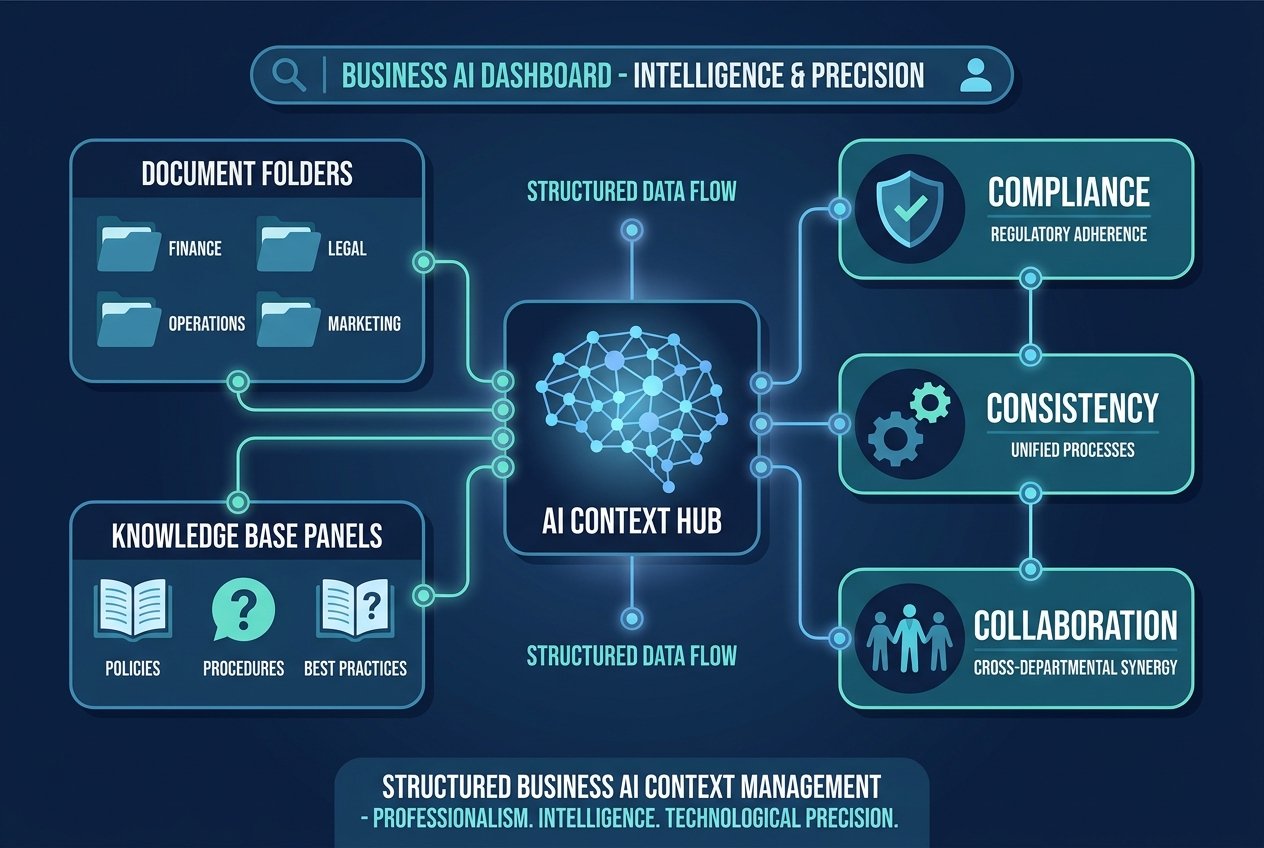
Claude Projects are saved workspaces inside Claude where you upload documents, add custom instructions once, and then reuse that setup across multiple conversations. Rather than starting every chat from scratch, your AI retains the files, tone, and business context you provide, effectively turning Claude into a business context AI that understands your organisation.
This matters because generic AI tools deliver generic results. A solicitor in Birmingham, a marketing agency in Manchester, and a fintech start-up in London all need different outputs, compliance frameworks, and brand voices. Claude Projects bridge that gap by grounding responses in your own materials, from internal policies and product specifications to client briefs and brand guidelines.
For UK enterprises navigating post-Brexit regulatory complexity and tightening data-protection expectations, having an AI knowledge base that references your own controlled documents significantly reduces risk compared to relying on a model’s general training data.
Step-by-Step: Building Your Custom AI Knowledge Base
1. Define Your Project Scope and Audience
Before uploading a single file, clarify what domain the project will serve. The most effective custom AI workspace setups focus on a stable business function rather than rapidly shifting, ad hoc tasks. Examples include:
- HR onboarding and employee policy queries
- Sales enablement and proposal drafting
- Marketing content creation with locked brand voice
- Client account management with retained briefs
- Internal IT support and process documentation
Separating projects by function reduces context bleed and keeps your knowledge base organised. A 2026 vendor survey of 755 UK mid-market leaders found that 91 per cent have deployed AI in some capacity, yet only 38 per cent can prove measurable ROI. One reason for that gap is the lack of structured implementation. Defining a clear project scope is the first step to closing it.
2. Curate High-Quality Source Materials
The value of your AI knowledge base depends entirely on the quality of the documents you upload. Instead of dumping every file you own into a project, curate a focused set of reference materials that are accurate, up to date, and free of internal contradictions.
Strong source materials for a Claude Project include:
- Brand tone-of-voice guides and style manuals
- Standard operating procedures and compliance checklists
- Product datasheets, pricing matrices, and technical FAQs
- Past winning proposals, case studies, and white papers
- Research notes and industry reports relevant to your sector
Remember that Claude does not have access to your live databases or intranet. If a policy changes, you must manually replace the file in the project to avoid stale outputs. For businesses with rapidly changing catalogues or compliance rules, this means establishing a simple refresh schedule, such as reviewing project files monthly.
3. Write Precise Custom Instructions
Custom instructions are the behavioural layer of your Claude Project. This is where you tell Claude how to respond: the tone it should adopt, the format it should follow, and the topics it should prioritise or avoid.
Effective instructions for a business context AI typically cover:
- Audience: Who is reading the output? Board members, clients, or junior staff?
- Tone: Formal, conversational, persuasive, or technical?
- Output structure: Bullet points, executive summaries, or full narratives?
- Constraints: Words to avoid, legal disclaimers to include, or topics that require human sign-off
- Priorities: Should Claude lead with cost savings, compliance, or innovation?
The more specific your instructions, the less time you spend correcting drafts later. Over time, this refinement compounds into significant productivity gains.
4. Test, Iterate, and Lock In Your Workflow
Once your files and instructions are in place, run a series of test prompts that mirror real tasks your team performs. Draft a client email, analyse a competitor announcement using your internal framework, or generate a training outline from your HR handbook.
Evaluate whether Claude’s outputs meet your quality bar without heavy editing. If they do not, the issue usually lies in one of three areas: ambiguous instructions, conflicting source files, or unrealistic expectations about generative AI. Refine and retest until the results are reliably usable.
At this stage, document your project setup and share access with relevant team members. Anthropic’s 2026 product roadmap suggests continuing enterprise expansion, so watch for new admin and collaboration controls that make team-wide Claude Projects even easier to govern.
Best Practices for Maintaining Governance
Businesses operating under UK GDPR, sector-specific regulations, or client confidentiality agreements need more than a powerful tool; they need a governed process. Here are four governance principles for your custom AI workspace:
Assign clear ownership. Every project should have a named owner responsible for updating files, reviewing outputs, and deciding who gets access.
Implement human review for external-facing content. Claude can accelerate drafting, but customer-facing proposals, legal advice, and regulated communications should always pass through a qualified human reviewer.
Track version history. Maintain a dated log of which files were uploaded, when instructions changed, and why. This audit trail is essential if you ever need to demonstrate how a particular output was generated.
Train your team on limitations. A recent UK business survey found that 20 per cent of firms cite a lack of internal AI expertise as a barrier to adoption. Investing in targeted training ensures your staff treat the AI knowledge base as a controlled tool, not an infallible oracle.
When to Seek Expert Help with Your Claude Projects Implementation
Building a Claude Project is straightforward, but scaling it across departments while maintaining governance, brand consistency, and compliance is not. Many UK businesses underestimate the work required to curate source materials, write effective instructions, and align AI outputs with actual business processes.
This is where professional support makes a difference. Kaizen AI Consulting helps UK organisations design, implement, and govern custom AI workspace environments that deliver measurable results. From selecting the right source documents and drafting precise custom instructions to training your teams and establishing update protocols, we ensure your business context AI setup is built for long-term reliability.
If you are exploring AI strategy for your business or need hands-on support configuring tools like Claude for your team, our consultants bring practical expertise across sectors including professional services, financial technology, and regulated industries.
Measuring the Impact of Your AI Knowledge Base
Once your Claude Project is live, track its value through tangible metrics. Common indicators include:
- Time saved per task compared to manual drafting
- Reduction in back-and-forth revisions on client documents
- Speed of onboarding new employees using the project as a Q&A resource
- Consistency scores across team outputs
- Employee satisfaction with internal knowledge access
Global data from early 2026 shows that 78 per cent of organisations now use AI in at least one business function, up from 55 per cent just a year earlier, according to Netguru’s AI adoption statistics. UK firms that build structured, governed AI knowledge base implementations will capture a disproportionate share of that productivity upside.
Getting Started with Your First Claude Project
If your organisation is new to Claude Projects, start small. Choose one stable, repetitive task that consumes more time than it should. Gather the five to ten most relevant documents, write one page of custom instructions, and run a two-week pilot with a single team member.
Measure the results, refine the setup, and then roll out to a wider group. This incremental approach reduces risk, builds internal confidence, and creates a blueprint you can replicate across other functions.
For businesses that want to accelerate this journey, get in touch with Kaizen AI Consulting today. We specialise in helping UK companies move from AI curiosity to operational excellence, and we can guide your team through every stage of building a secure, effective custom AI workspace with Claude.
Final Thoughts
The UK AI market is projected to grow from USD 4.0 billion in 2025 to USD 23.1 billion by 2034, representing a compound annual growth rate of nearly 21 per cent, per IMARC Group research. That growth is not abstract; it is happening inside the organisations that treat AI as a fundamental operating layer rather than a novelty.
Claude Projects offer UK businesses an accessible, affordable entry point into that operating layer. By building a focused AI knowledge base, writing clear custom instructions, and governing the process properly, you can transform the way your team accesses information, drafts content, and serves clients. The technology is ready. The question is whether your organisation is prepared to use it strategically.